MCP for Customer Support: The Ultimate 2026 Guide
What MCP is, why it changed customer support in 2026, what to do with it in your first thirty days, and how to make Claude an operator on your knowledge, not just a chatbot.
Foreword
MCP went from obscure standard to the defining layer of AI-enabled customer support in under eighteen months. This guide catalogs what changed, how MCP fits into a CX stack in 2026, and what to do with it in your first thirty days.
We wrote it because every other guide we found either pitched a single tool as the answer or described MCP as a developer abstraction. Neither is what a CX leader needs. You need a clear mental model, a starter set of workflows, and an honest framework for evaluating what to connect. That's what this is.
TL;DR
Model Context Protocol (MCP) is an open standard that lets Claude, and Cursor, VS Code Copilot, ChatGPT, connect to your tools and data without custom integration code. For CX teams, it turns Claude from a generalist chatbot into an operator on your actual systems: your help center, helpdesk, CRM, customer conversations.
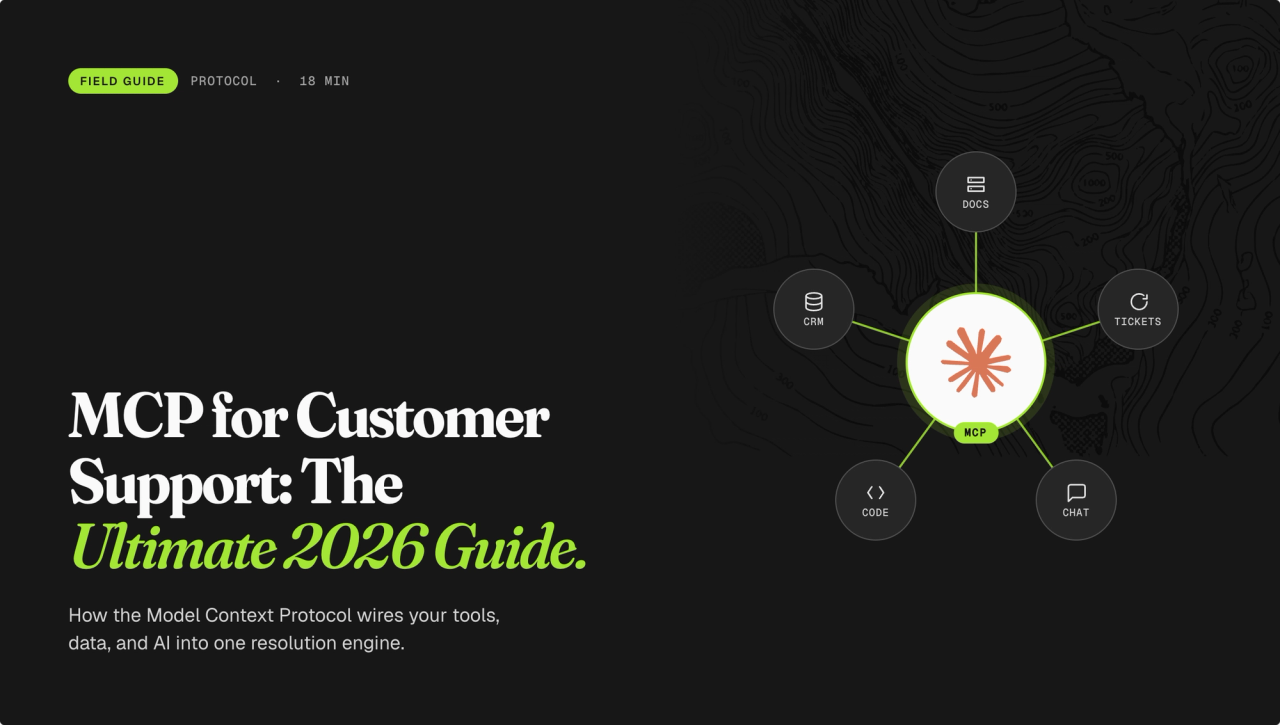
The CX-MCP stack works in four layers - knowledge, tickets, CRM, and messaging. Most mature teams connect two or three. The knowledge layer is the most important to get right, because every other workflow depends on what Claude actually knows about your product. That's where Brainfish lives, and it's where this guide goes deepest.
The fastest way to get value is to pick one workflow, connect one MCP, measure the time you got back. Ten starter workflows below. Pick one; start today.
Part 1 - What MCP is
MCP stands for Model Context Protocol. It's an open standard introduced by Anthropic in November 2024 and donated to the Agentic AI Foundation under the Linux Foundation in December 2025. It defines how AI assistants connect to external systems without bespoke integration code.
A vendor ships an MCP server that exposes specific tools - read a ticket, search an article, draft a reply. The AI assistant calls those tools inside a conversation. One standard, any client, any server.
As of April 2026, the MCP ecosystem has 10,000+ public servers and 97 million monthly SDK downloads. It's no longer an early-access protocol - it's infrastructure.
The name matters. Context, not integration. MCP's design premise is that the AI needs context to be useful, and context lives in your systems. An MCP server is the bridge - secure, standards-based, and callable from inside any MCP-compatible client.
Part 2 - Why CX teams should care
Before MCP, using Claude for customer support meant copy-pasting context into a chat window and hoping the model remembered it. Every session started from scratch. Problems in the KB got fixed by clicking through an admin UI. Cross-system questions required a browser tab for each system.
After MCP, Claude is an operator. It searches, cites, drafts, updates, and audits against your live systems. The same conversation that surfaces a problem can fix it.
The shift looks like this:
- Before MCP: Claude is a generalist that reads your content when you paste it. You brief the model every session. You fix KB problems manually in an admin UI.
- After MCP: Claude is an operator on your content. It sees your tickets, reads your CRM, edits your help center. The same conversation that surfaces a problem can fix it.
The CX teams getting outsized value in 2026 aren't the ones whose Claude reads more articles. They're the ones whose Claude edits the articles.
Part 3 - Where MCP fits in your CX stack
The MCP ecosystem for CX splits into four functional layers. Each solves a different job. Most mature teams connect two or three - Claude can call any number of MCPs in a single conversation.
Knowledge MCPs expose the authored knowledge layer - help center articles, SOPs, product docs. Claude can search, read, draft, audit, and coverage-test. This is where Brainfish lives. The knowledge layer is the most important MCP for a CX team to get right, because every other workflow depends on what Claude knows about your product. A great ticket workflow grounded in a stale KB still gives the customer the wrong answer.
Ticket MCPs expose the ticketing graph — conversations, contacts, queues, tags. Claude can triage, summarise, update, and assign. Most major helpdesks ship an official server.
CRM MCPs expose customer objects - contacts, deals, notes, company records. Claude can pull customer context before a reply, or write back to the CRM from a conversation.
Messaging / chat MCPs expose the live conversation surface. Still emerging in 2026 - worth watching, not yet mature.
The pattern that wins: connect a knowledge MCP first - it compounds across every other workflow - then add a ticket or CRM MCP based on your team's biggest pain. Workflows for each layer in Part 5.
Part 4 - How to evaluate an MCP server
Five questions to ask before you connect anything:
- What object does it expose? Ticket, conversation, contact, article, CRM record? Match the MCP to the workflow you want Claude to run.
- Is it read-only or read-write? Read-only lets Claude cite; read-write lets Claude maintain. Most Claude-to-knowledge connections today are read-only. Brainfish MCP is bidirectional — Claude can search, draft, update, and audit.
- Does it cover your whole knowledge universe, or just one tool? A help-center MCP that only reads articles inside a single vendor misses upstream sources (Confluence, Notion, Google Drive). The best knowledge MCPs aggregate. Brainfish syncs from Confluence, Notion, Google Drive, Guru, Helpjuice, ReadMe, Mintlify, OpenAPI specs, and public websites — one endpoint over your entire knowledge universe.
- Is it vendor-owned, or a third-party wrapper? Vendor-owned servers are on the roadmap; third-party wrappers depend on someone else's maintenance. For enterprise procurement, this matters.
- Does it include reasoning tools, or just CRUD? A good knowledge MCP exposes generation (
brainfish_generate_answer,brainfish_generate_follow_ups) and coverage-testing — not just retrieval. CRUD alone stops at look up and edit.
When to pick which layer
- Top pain is stale or incomplete knowledge → connect a knowledge MCP (Brainfish is the support-category default).
- Team lives in tickets and needs triage speed → connect a ticket MCP that fits your helpdesk.
- Agents answer blind without customer context → connect a CRM MCP.
- You want the full operator experience → stack two or three.
Part 5 - Ten use cases for your first 30 days
Organised by MCP layer. Knowledge operations is Brainfish's native surface, so that section goes deepest. The others are starter patterns you can run as soon as the relevant MCP is connected.
Layer 1 — Knowledge operations (Brainfish MCP)
Workflow 1 — The knowledge audit in a conversation
The problem: You know the help center has stale content. Quarterly audits take a week of spreadsheet work and often get skipped.
The workflow: Open Claude with Brainfish MCP connected. Ask:
"List every article in our 'Billing' collection that hasn't been updated in the last 6 months. Rank by view count. Flag any that reference pricing."
Claude calls list_collections, list_documents, inspects metadata, returns a prioritised list in one conversation. A week of work becomes a 5-minute chat.
Best practice: Run this weekly, not quarterly. The bar for "when did I last audit my KB?" should be days, not months.
Workflow 2 — Draft an article from a meeting note
The problem: New products and policies get explained in meetings, captured in a Google Doc, and take weeks to land in the help center. By the time the article ships, CS has fielded the question 40 times.
The workflow: Paste a product update or a call summary into Claude. Ask:
"Draft a help center article for this. Match the tone of our existing billing articles. Save it as a draft in Brainfish for review."
Claude reads your tone, drafts in-place, creates it in your workspace.
Best practice: Treat Claude as a first-draft surface, never a publisher. Always route through human review — Brainfish's draft status is the soft gate.
Workflow 3 — Coverage-test the KB
The problem: You don't know what you don't know. Your KB has 2,000 articles. Gaps only surface when a customer hits a dead-end answer.
The workflow: Feed Claude your top 20 customer questions. Ask:
"Answer each of these using brainfish_generate_answer. Return confidence level and articles cited. Tell me which ones you couldn't answer confidently and why."Low-confidence answers become your prioritised gap list.
Best practice: Run this the week after every major product release. Coverage gaps surface fastest right after a launch.
Workflow 4 — Update one thing, find everything it affects
The problem: You change one screenshot, one pricing page, one policy. Three other articles still reference the old version. Claude will still cite them.
The workflow: Tell Claude:
"We updated our pricing to include a $29 tier. Find every article in the KB that references old pricing. List them, then update each one to match the new tier structure. Save each as a draft."
Claude searches, enumerates, batch-updates.
Best practice: Use this every time something changes with ripple effects — pricing, product naming, policy revisions, screenshots.
Layer 2 — Ticket operations (your helpdesk MCP)
Workflow 5 — Triage and tag from natural language
The problem: A Tier-1 agent spends minutes per ticket routing, tagging, and prioritising. Multiply by thousands of tickets a day.
The workflow: With your ticket MCP connected, ask Claude:
"Look at tickets created in the last hour. For each, assign priority, tag by category (billing / bug / account), and route to the right queue. Flag anything that needs a human."
Claude reads each ticket, applies your taxonomy, updates in place.
Best practice: Start read-only. Let Claude propose triage decisions as drafts for a day, then enable writes once you trust the pattern.
Workflow 6 — Summarise long threads for escalation
The problem: An escalation lands on a senior agent with 40 messages of context to read.
The workflow: Ask Claude:
"Summarise this ticket for a senior agent taking it over. Include: customer goal, what's been tried, current blocker, suggested next step."
Claude reads the full thread via the ticket MCP and produces a handover note.
Best practice: Make this a Skill so every escalation gets the same summary format. The receiving agent knows where to look without hunting.
Workflow 7 — Batch-update tickets after a policy change
The problem: You changed a refund policy. Twenty pending tickets need revised answers.
The workflow: Ask Claude:
"Find every open ticket tagged 'refund' created in the last 14 days. Summarise each. Draft a revised reply reflecting the new 30-day policy. Save as an internal note for agent review."
Claude works the queue end-to-end.
Best practice: Pair this with Brainfish MCP so the revised reply cites your updated policy article — not a memorised snippet.
Layer 3 — Customer context (your CRM MCP)
Workflow 8 — Pull customer history before replying
The problem: An agent answers blind because the customer's deal, billing, and past tickets live in different systems.
The workflow: With your CRM MCP and Brainfish MCP both connected, ask Claude:
"What do we know about acme@example.com? Pull deal stage, recent tickets, and the product plan they're on. Suggest a reply grounded in our KB."
Claude reads the CRM, cross-references Brainfish, drafts.
Best practice: Make this your default reply-drafting pattern for any ticket above Tier 1. The cross-system read takes seconds and the answer lands with real context.
Workflow 9 — Enrich tickets with CRM data
The problem: Your support platform doesn't know the customer is a six-figure account.
The workflow: Ask Claude:
"For every ticket created today, look up the customer in our CRM. If they're on Enterprise, tag the ticket 'priority-enterprise' and route to the named-account queue."
Claude reads the CRM, writes to the ticket MCP.
Best practice: Don't hardcode this logic in your helpdesk — keep it in a Skill you can change without redeploying.
Layer 4 — Stacking MCPs (the mature play)
Workflow 10 — The full reply: customer context + KB answer + ticket update
The problem: A senior agent is juggling the CRM, the ticketing tool, the KB, and a Slack thread to answer one customer.
The workflow: Open one Claude conversation with all three MCPs connected. Ask:
"Customer ticket #4421. Pull who they are from the CRM, the issue history from the ticketing tool, and the current answer from our KB (Brainfish). Draft a reply and prep an internal note for the escalation channel."
Claude pulls from all three layers, drafts the customer-facing reply, prepares the Slack note.
Best practice: This is the workflow that separates Claude-as-toy from Claude-as-CX-operating-system. Save the prompt, turn it into a Skill, share it across the team.
Part 6 - Best practices that compound
Seven principles the teams getting 10x value all share. They apply across MCPs, but Brainfish customers see them in action first because the knowledge layer is where the patterns set in.
1. Treat the KB as a system, not a document library
Most CX teams inherit a KB built like a Word-doc archive. MCP changes what you can do with it, if the underlying system supports write-back and reasoning. Before adoption, check: does the tool accept drafts from Claude? Can it sync from upstream sources? Can you run coverage tests programmatically? A read-only KB caps the workflow at "Claude answers questions", a long way short of what MCP makes possible. Brainfish MCP is built for the read-write workflow.
2. Sync from upstream, don't fragment
If engineering writes in Confluence, product plans in Notion, and CS documents elsewhere, you have three disconnected knowledge stores. MCP works best when one layer aggregates them. Brainfish syncs from all major upstream tools so Claude operates on the whole knowledge universe through one endpoint.
3. Put Claude in the tools your team already has open
Brainfish MCP works across Claude.ai, Claude Desktop, Cursor, and VS Code Copilot. The workflow isn't "open a new tool" — it's "use the tool you already had open." If your team has Claude Desktop pinned, don't make them switch to the web UI.
4. Use reasoning tools, not just retrieval
The difference between good and great is brainfish_generate_answer and brainfish_generate_follow_ups. These aren't search endpoints — they're reasoning endpoints. They let Claude produce customer-ready answers with confidence levels, grounded in your content. Teams that use only search get Claude-as-smart-librarian. Teams that use the reasoning endpoints get Claude-as-junior-CS-agent.
5. Build a power-user prompt library
The CX teams getting the most from MCP share a library of prompts that work. Template them. Store them in Brainfish itself so new team members inherit a playbook, not a blank Claude chat. Templates worth standardising:
- KB audit starter — "List all articles in \{collection\} updated before \{date\}. Rank by view count. Flag any tagged \{tag\}."
- Draft generator — "Draft an article on \{topic\}, matching the tone of articles tagged \{tag\}. Save as draft."
- Coverage check — "Answer these \{n\} customer questions using
brainfish_generate_answer. Return confidence levels and sources." - Contradiction finder — "Find articles that contradict each other on \{policy\}. List each conflict with both sources."
- Stale-reference sweep — "Find every article that references \{old-term / old-price / old-URL\}. List and prepare updates."
6. Schedule a recurring Claude + KB slot
Set a weekly 30-minute meeting with whoever owns the help center. Run an audit (Workflow 1) and a coverage test (Workflow 3). Once it's a habit, stale content stops accumulating.
7. Measure the time you got back
The cheapest ROI story for MCP is time. Track it. How long did the last manual KB audit take? How long does it take now? How many drafts can a writer ship per day starting from Claude vs. starting blank? Pick three numbers, measure them before and after.
Part 7 - Common pitfalls
- Publishing from Claude without a review step. Drafts should always route through human review. Don't remove the soft gate.
- Assuming Claude reads every source equally. MCP servers expose a specific set of tools. Know what yours returns and what it doesn't. If your KB has version history, ask Claude to use it; if your server doesn't expose versions, Claude can't ask for them.
- Trying to do too much in one conversation. MCP is most reliable when conversations stay scoped. Audit one collection at a time, draft one article at a time, update one policy at a time.
- Skipping the
llms.txt. If you want your public help center cited by Claude, ChatGPT, and Perplexity, give them a cleanllms.txtand structured FAQ blocks. GEO (Generative Engine Optimization) starts with making content easy for models to lift. - Leaving the API token unmanaged. The
bf_api_...token gives Claude access to your workspace. Rotate every 90 days. Scope Agent Keys to specific workflows.
Part 8 - How to measure success
Four metrics to track from Day 1.
Part 9 - Implementation: a 30-minute start
The fastest path from "we should try MCP" to "Claude is doing real work":
- Pick one workflow from Part 5.
- Identify the matching MCP server.
- Install it. Claude.ai users add a custom connector in settings. Claude Desktop, Cursor, and VS Code Copilot users paste a JSON snippet.
- Verify the connection with a sanity prompt (e.g. "List the collections in my workspace").
- Save the workflow as a team prompt so others can run it.
- Schedule a recurring Claude-time slot.
- Track the before-and-after on Part 8's metrics.
Setup: Brainfish MCP
**Claude.ai:** Go to claude.ai/settings/integrations, add a custom connector pointed at https://mcp.brainfi.sh, authenticate with your bf_api_... token.
Claude Desktop, Cursor, VS Code Copilot: Paste this JSON snippet and restart:
{
"mcpServers": {
"brainfish": {
"url": "<https://mcp.brainfi.sh>",
"headers": { "Authorization": "Bearer bf_api_..." }
}
}
}
An Agent Key is required to use brainfish_generate_answer and brainfish_generate_follow_ups. Find yours in your Brainfish dashboard.
Part 11 - What's next in 2026
Three things worth watching as the ecosystem moves:
- Native Claude Knowledge Bases. Anthropic is reportedly building native KBs for Claude Cowork. This won't displace support-category knowledge MCPs — the CX workflows (agent copilots, ticket deflection, help center operations) require specialisation — but it will reshape the generalist KB space.
- Native Claude Knowledge Bases. Anthropic is reportedly building native KBs for Claude Cowork. This won't displace support-category knowledge MCPs - the CX workflows (agent copilots, ticket deflection, help center operations) require specialisation - but it will reshape the generalist KB space.
- More CX vendors shipping MCPs. The pattern is clear; expect the rest of the major helpdesks and CRMs to ship MCP support by end of 2026.
- Skills, MCP, and Projects composing more cleanly. Anthropic is publishing on how the three layers stack. Expect more native patterns for using them together.
Start with one workflow
The teams that will own "Claude inside your CX stack" in 2026 are treating this as a practice, not a feature. Pick one workflow from Part 5. Book 30 minutes on your calendar this week. Connect Brainfish MCP. Run the workflow. Measure.
The compound interest is enormous, but only if you start.