

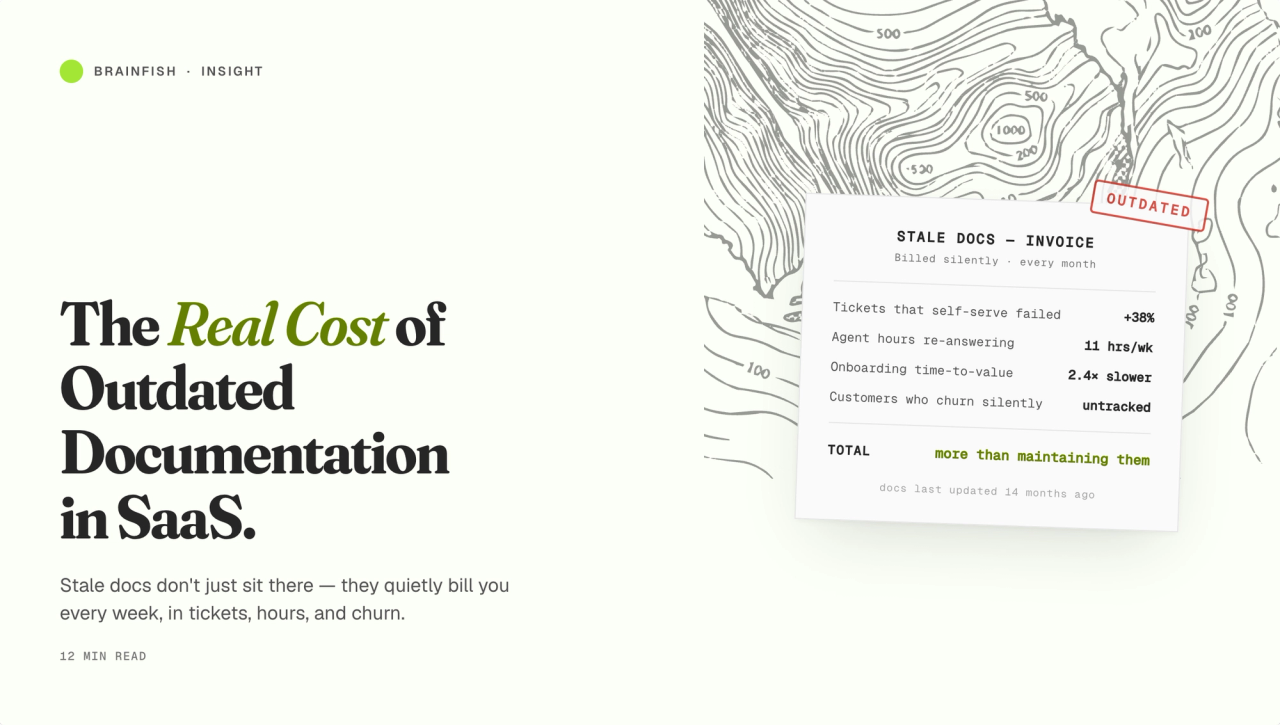
The Real Cost of Outdated Documentation in SaaS
Every SaaS support team knows the feeling: a customer opens a ticket confused about a feature, an agent looks into it, and the help center article is describing a version of the product that was deprecated two quarters ago. Someone makes a note to update it. That note gets lost. The cycle repeats.
Outdated documentation is so common it's almost background noise. But the costs it generates are real, measurable, and compounding. This post breaks them down.
The Visible Costs Everyone Knows About
Unnecessary support tickets
This is the most direct cost. When a customer can't find an accurate answer in your help center, they open a ticket. The average cost of a support ticket ranges from $15 to $50 depending on complexity and whether it requires escalation. Most estimates put the real fully-loaded cost (including agent time, tooling, and management overhead) closer to $25–40 for a standard Tier-1 query.
If 20% of your tickets are generated by documentation that's simply inaccurate or outdated, and you're handling 5,000 tickets per month, that's 1,000 unnecessary tickets at $25–40 each. That's $25,000–40,000 per month in avoidable support cost — $300,000–480,000 annually.
Most support teams don't track this explicitly. They see the ticket volume but don't attribute it to documentation quality. Which means they can't fix it.
Agent time spent on fixable queries
Beyond the ticket cost itself, there's agent time. An agent who handles the same question for the hundredth time isn't building skills, deepening customer relationships, or solving novel problems. They're compensating for a documentation failure.
The opportunity cost is significant. Every minute an agent spends on a ticket that should have been deflected by a good help center article is a minute not spent on complex escalations, proactive customer success outreach, or the high-judgment work that actually justifies their role.
The Hidden Costs Most Teams Miss
Customer trust erosion
This is the most underrated cost of outdated documentation, and it compounds silently.
When a customer follows help center instructions that are wrong, two things happen. First, their problem doesn't get solved. Second, they learn not to trust your help center. The second effect is the more damaging one.
Customers who've been burned by inaccurate documentation don't try the help center again. They go straight to support. Your self-service channel has effectively been removed from their consideration set — not because it doesn't exist, but because they've learned it can't be trusted.
A help center that 30% of customers actively distrust has lower effective deflection capacity than a smaller, more accurate help center with high trust. Trust is a multiplier on deflection rate, and outdated content destroys it.
Agent confidence erosion
Agents who regularly encounter customers who were misled by the help center start to distrust it themselves. Instead of referring customers to self-service resources, they answer everything directly — adding to handle time and creating a dependency on human agents that shouldn't exist.
This is a cultural shift that's hard to reverse. Once agents stop pointing to the help center as a first-line resource, the entire self-service investment depreciates.
Churn signal amplification
Customers who can't find accurate answers to basic product questions don't just open tickets. Some of them quietly decide the product is too difficult to use and start looking at alternatives. Documentation quality is a proxy for product quality in customers' minds — confusing or wrong help center content reads as a poorly-designed product.
This effect is hard to attribute in churn analysis, but it's real. Customer effort score (CES) research consistently shows that customers who have to work hard to solve problems are significantly more likely to churn.
AI answer quality degradation
This cost is emerging fast as teams deploy AI support agents and help widgets powered by their existing documentation.
AI systems that retrieve and synthesize answers from your knowledge base are only as good as that knowledge base. Outdated documentation doesn't just mislead customers who read it directly — it feeds incorrect information into AI-generated responses that potentially reach 10x more customers than the original article.
An AI agent citing an outdated article at scale is a trust catastrophe waiting to happen. Teams that deploy AI on top of a poorly-maintained knowledge base often see initially promising metrics collapse as the volume of incorrect AI-generated answers triggers a customer trust crisis.
Why Documentation Goes Out of Date
The root causes are structural, not behavioral. It's not that teams don't care — it's that the systems and incentives don't support maintenance:
Documentation isn't part of the release process. Product teams ship features. Documentation isn't gated in the release checklist. A UI change goes live; the help article doesn't get updated until someone notices the mismatch.
No one owns documentation maintenance. In most SaaS companies, help center content falls in the gap between product, support, and marketing. It's everyone's responsibility in theory and no one's in practice.
There's no system for detecting staleness. Without tooling that flags articles that may need review, teams can't know which articles are out of date without manually auditing the entire help center — a project that never gets prioritized.
Writing is prioritized over editing. New content gets created. Old content sits. The knowledge base grows in volume while the accuracy rate declines.
How to Calculate Your Documentation Debt
Here's a simple framework for quantifying the cost in your organization:
Step 1: Categorize a sample of recent tickets. Take 200–300 tickets from the last 60 days. For each one, ask: was there an existing help center article that should have answered this question? If yes: was the article findable? Was it accurate? This gives you a documentation-attributable ticket rate.
Step 2: Multiply by your ticket cost. Tickets_per_month × documentation_attributable_rate × cost_per_ticket = monthly documentation debt.
Step 3: Estimate trust erosion. This is harder to quantify directly, but self-service adoption rate is a proxy. If fewer than 30–40% of customers attempt self-service before opening a ticket, low trust is probably a factor.
Step 4: Model the AI risk. If you're deploying or planning to deploy AI on your documentation, multiply your inaccuracy rate by your projected AI query volume. This is your exposure if you don't fix the knowledge base first.
How to Fix It (Without a Massive Audit Sprint)
The instinctive response to documentation debt is a cleanup sprint: dedicated time to review and update everything. This helps temporarily but doesn't address the structural causes.
The more durable fix:
Gate documentation in your release process. Any product change that affects the UI or a customer-facing workflow should trigger a documentation review ticket. This prevents new debt from accumulating.
Use ticket data as a documentation signal. Tickets about a topic that has a help center article are a quality signal. Route these back to whoever owns that content as a review trigger.
Implement freshness scoring. Set an expiry date on articles — 12 months for stable content, 3–6 months for rapidly-changing features. Review on schedule rather than in response to customer complaints.
Invest in AI-assisted maintenance. Platforms like Brainfish can detect when content is likely outdated by analyzing ticket patterns and search queries, surfacing specific articles for review rather than requiring a manual audit of the entire knowledge base.
The ROI of Getting This Right
Teams that treat documentation maintenance as a first-class operational discipline typically see:
- 30–60% reduction in documentation-attributable ticket volume
- Higher self-service adoption as customer trust improves
- Better AI resolution rates when AI is deployed on top of a clean knowledge base
- Lower agent handle time as agents spend less time on redundant queries
- Improved CSAT from customers who solve problems quickly and accurately
The investment required is process change and tooling, not headcount. The return is measurable within one quarter.
How Brainfish Approaches Documentation Freshness
Brainfish builds freshness detection and knowledge gap identification into the core platform. Instead of waiting for customers to report wrong answers, Brainfish analyzes ticket patterns, search queries, and usage signals to surface content that's likely stale — before it generates more tickets.
The result: documentation that stays current with far less manual effort, and an AI knowledge layer that gives accurate answers because the underlying knowledge is maintained.