Posts

Reduce Slack Escalations to Engineering

Published on

March 3, 2026

Bubble
Bubble
Bubble
Bubble
Bubble
Bubble
Bubble
Bubble
Bubble
Bubble
Bubble
Bubble
Bubble
Bubble
Bubble
Bubble
Bubble
Bubble
Bubble
Bubble
Bubble
Bubble
Reduce Slack Escalations to Engineering

Reduce Slack escalations without slowing your team. Learn how to give support better context, build structured workflows, and keep documentation up to date so engineers stay focused and product velocity stays high.

Slack feels fast. But fast becomes chaotic when every product question interrupts an engineer.

Each escalation costs focus.

Each interrupt slows shipping.

Each unclear answer creates more confusion.

The goal is simple: reduce Slack escalations without slowing product velocity.

Here's how.

Why Slack Escalations Happen

Escalations rarely start as real bugs.

They start as:

  • Feature confusion
  • Missing context
  • Outdated documentation
  • Unclear ownership
  • Support lacking usage visibility

When support lacks full context, they escalate.

When documentation lags behind product changes, they escalate.

When Slack is the fastest way to get an answer, people use it.

Engineering becomes the default search engine.

Step 1: Create a Structured Customer Request Workflow

Slack shouldn't be your ticketing system.

You need structure.

Do this:

  • Log every customer request in a system like Linear
  • Use Slack only for urgent visibility
  • Flag urgent issues clearly
  • Assign engineers to weekly triage
  • Review and prioritize daily

This does three things:

  1. Makes requests visible
  2. Creates accountability
  3. Stops random drive-by interrupts

Engineering works from a queue, not from noise.

Velocity stays protected.

Step 2: Give Support the Context They Need

Most escalations happen because support lacks information.

Fix that first.

Support should see:

  • Historical support conversations
  • Feature usage patterns
  • Account activity trends
  • Previous implementation notes

When support understands how a customer uses the product, they resolve more issues without escalating.

Example:

Instead of asking engineering, "Is this feature broken?"

Support can say, "You haven't enabled X setting, which is required for this workflow."

No escalation needed.

Step 3: Move From Reactive to Preventive

Escalation reduction isn't about deflection.

It's about prevention.

Prevention means:

  • Identify common confusion points
  • Improve onboarding guidance
  • Update documentation automatically as the product evolves
  • Surface contextual help inside Slack before escalation happens

If users repeatedly ask the same question, the product or knowledge layer failed.

Fix root causes, not symptoms.

For example:

If 30% of Slack escalations relate to feature configuration, improve:

  • In-app guidance
  • Setup validation
  • Default settings
  • Onboarding walkthroughs

Engineers should fix product friction, not answer repeat questions.

Step 4: Automate Knowledge Creation

Documentation debt drives escalation.

When help content lags behind product changes, support loses confidence and escalates faster.

Solve this by:

  • Generating knowledge from product updates
  • Turning internal explanations into structured documentation
  • Updating help articles automatically when workflows change
  • Making answers searchable inside Slack

When documentation stays current, support answers faster.

Escalations drop.

Step 5: Measure the Right Metrics

If you measure ticket deflection, you optimize for hiding tickets.

Measure outcomes instead.

Track:

  • Successful task completion rates
  • Time to value for new features
  • Feature adoption depth
  • Customer effort score
  • Escalation rate per active account

If task completion improves, Slack escalations fall naturally.

If time to value drops, confusion drops.

If adoption increases, engineers spend less time clarifying intent.

Focus on product health, not support volume.

What This Looks Like in Practice

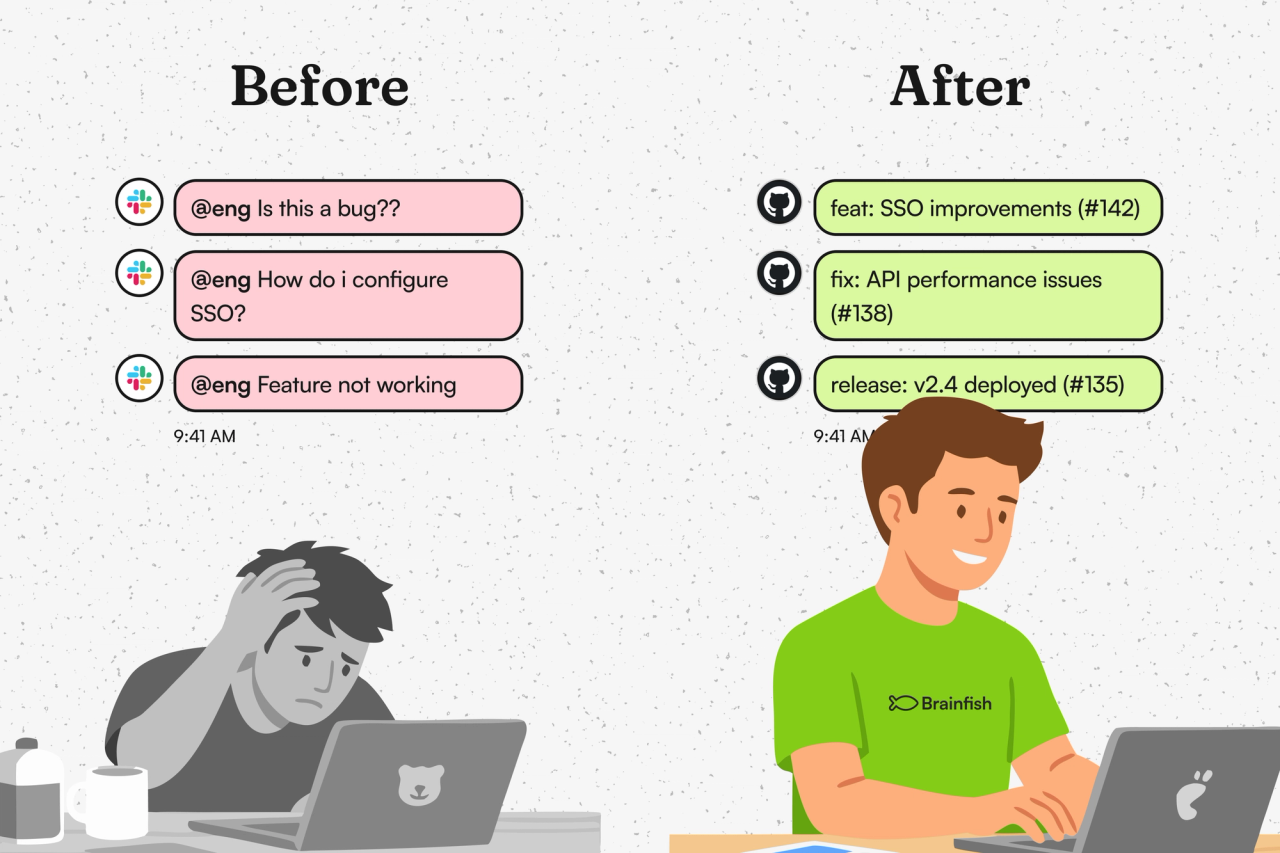
Before:

  • Slack threads tagging engineers daily
  • Support unsure whether issues are bugs or configuration errors
  • Engineers switching context mid-sprint
  • Small accounts ignored because escalation triage favors enterprise

After:

  • Clear ticket logging
  • Defined escalation paths
  • Support armed with usage context
  • Updated knowledge accessible inside Slack
  • Engineering working from prioritized queues

Engineering regains focus.

Support gains confidence.

Customers get faster answers.

Velocity improves.

The Real Outcome

Reducing Slack escalations isn't about blocking access to engineers.

It's about raising the capability of everyone around them.

When support has context, knowledge, and structured workflows, engineering handles fewer interruptions.

When product confusion gets fixed at the source, questions disappear entirely.

Protect engineering time.

Empower support.

Design for prevention.

That's how you reduce Slack escalations without slowing product velocity.

import time
import requests
from opentelemetry import trace, metrics
from opentelemetry.sdk.trace import TracerProvider
from opentelemetry.sdk.metrics import MeterProvider
from opentelemetry.sdk.trace.export import ConsoleSpanExporter, SimpleSpanProcessor
from opentelemetry.sdk.metrics.export import ConsoleMetricExporter, PeriodicExportingMetricReader

# --- 1. OpenTelemetry Setup for Observability ---
# Configure exporters to print telemetry data to the console.
# In a production system, these would export to a backend like Prometheus or Jaeger.
trace.set_tracer_provider(TracerProvider())
tracer = trace.get_tracer(__name__)
span_processor = SimpleSpanProcessor(ConsoleSpanExporter())
trace.get_tracer_provider().add_span_processor(span_processor)

metric_reader = PeriodicExportingMetricReader(ConsoleMetricExporter())
metrics.set_meter_provider(MeterProvider(metric_readers=[metric_reader]))
meter = metrics.get_meter(__name__)

# Create custom OpenTelemetry metrics
agent_latency_histogram = meter.create_histogram("agent.latency", unit="ms", description="Agent response time")
agent_invocations_counter = meter.create_counter("agent.invocations", description="Number of times the agent is invoked")
hallucination_rate_gauge = meter.create_gauge("agent.hallucination_rate", unit="percentage", description="Rate of hallucinated responses")
pii_exposure_counter = meter.create_counter("agent.pii_exposure.count", description="Count of responses with PII exposure")

# --- 2. Define the Agent using NeMo Agent Toolkit concepts ---
# The NeMo Agent Toolkit orchestrates agents, tools, and workflows, often via configuration.
# This class simulates an agent that would be managed by the toolkit.
class MultimodalSupportAgent:
    def __init__(self, model_endpoint):
        self.model_endpoint = model_endpoint

    # The toolkit would route incoming requests to this method.
    def process_query(self, query, context_data):
        # Start an OpenTelemetry span to trace this specific execution.
        with tracer.start_as_current_span("agent.process_query") as span:
            start_time = time.time()
            span.set_attribute("query.text", query)
            span.set_attribute("context.data_types", [type(d).__name__ for d in context_data])

            # In a real scenario, this would involve complex logic and tool calls.
            print(f"\nAgent processing query: '{query}'...")
            time.sleep(0.5) # Simulate work (e.g., tool calls, model inference)
            agent_response = f"Generated answer for '{query}' based on provided context."
            
            latency = (time.time() - start_time) * 1000
            
            # Record metrics
            agent_latency_histogram.record(latency)
            agent_invocations_counter.add(1)
            span.set_attribute("agent.response", agent_response)
            span.set_attribute("agent.latency_ms", latency)
            
            return {"response": agent_response, "latency_ms": latency}

# --- 3. Define the Evaluation Logic using NeMo Evaluator ---
# This function simulates calling the NeMo Evaluator microservice API.
def run_nemo_evaluation(agent_response, ground_truth_data):
    with tracer.start_as_current_span("evaluator.run") as span:
        print("Submitting response to NeMo Evaluator...")
        # In a real system, you would make an HTTP request to the NeMo Evaluator service.
        # eval_endpoint = "http://nemo-evaluator-service/v1/evaluate"
        # payload = {"response": agent_response, "ground_truth": ground_truth_data}
        # response = requests.post(eval_endpoint, json=payload)
        # evaluation_results = response.json()
        
        # Mocking the evaluator's response for this example.
        time.sleep(0.2) # Simulate network and evaluation latency
        mock_results = {
            "answer_accuracy": 0.95,
            "hallucination_rate": 0.05,
            "pii_exposure": False,
            "toxicity_score": 0.01,
            "latency": 25.5
        }
        span.set_attribute("eval.results", str(mock_results))
        print(f"Evaluation complete: {mock_results}")
        return mock_results

# --- 4. The Main Agent Evaluation Loop ---
def agent_evaluation_loop(agent, query, context, ground_truth):
    with tracer.start_as_current_span("agent_evaluation_loop") as parent_span:
        # Step 1: Agent processes the query
        output = agent.process_query(query, context)

        # Step 2: Response is evaluated by NeMo Evaluator
        eval_metrics = run_nemo_evaluation(output["response"], ground_truth)

        # Step 3: Log evaluation results using OpenTelemetry metrics
        hallucination_rate_gauge.set(eval_metrics.get("hallucination_rate", 0.0))
        if eval_metrics.get("pii_exposure", False):
            pii_exposure_counter.add(1)
        
        # Add evaluation metrics as events to the parent span for rich, contextual traces.
        parent_span.add_event("EvaluationComplete", attributes=eval_metrics)

        # Step 4: (Optional) Trigger retraining or alerts based on metrics
        if eval_metrics["answer_accuracy"] < 0.8:
            print("[ALERT] Accuracy has dropped below threshold! Triggering retraining workflow.")
            parent_span.set_status(trace.Status(trace.StatusCode.ERROR, "Low Accuracy Detected"))

# --- Run the Example ---
if __name__ == "__main__":
    support_agent = MultimodalSupportAgent(model_endpoint="http://model-server/invoke")
    
    # Simulate an incoming user request with multimodal context
    user_query = "What is the status of my recent order?"
    context_documents = ["order_invoice.pdf", "customer_history.csv"]
    ground_truth = {"expected_answer": "Your order #1234 has shipped."}

    # Execute the loop
    agent_evaluation_loop(support_agent, user_query, context_documents, ground_truth)
    
    # In a real application, the metric reader would run in the background.
    # We call it explicitly here to see the output.
    metric_reader.collect()

Frequently Asked Questions

No items found.
Share this post

Recent Posts...