
Lately, we get the same message from customers: they've just onboarded their team to Claude, and now they want to know how to pair it with Brainfish. Makes sense. You've invested in a knowledge base and your try to keep your product knowledge as accurate as possible. You've invested in AI agents. The question is how to get everything talking to each other.
That's what the Brainfish MCP server does. It's a Model Context Protocol connector that links Claude directly to your Brainfish knowledge base so you can search it, read from it, draft into it, and audit it without leaving your AI assistant.
We've been watching what teams actually do once they make that connection. Below are four examples from people who've been running it for a while.
GTM Engineer @ Brainfish: Four workflows in one week
Neville is a GTM engineer at Brainfish, and one of his responsibilities is knowledge management. In the week after connecting MCP, he ran four distinct workflows he'd previously been doing by hand or deferring entirely.
Worth noting: none of this is GTM-specific. If keeping your help docs, knowledge base, or product documentation accurate falls anywhere in your job description, whether you're in support, product, engineering, or GTM, these workflows translate directly.
1) Auditing the entire knowledge base without clicking through the platform
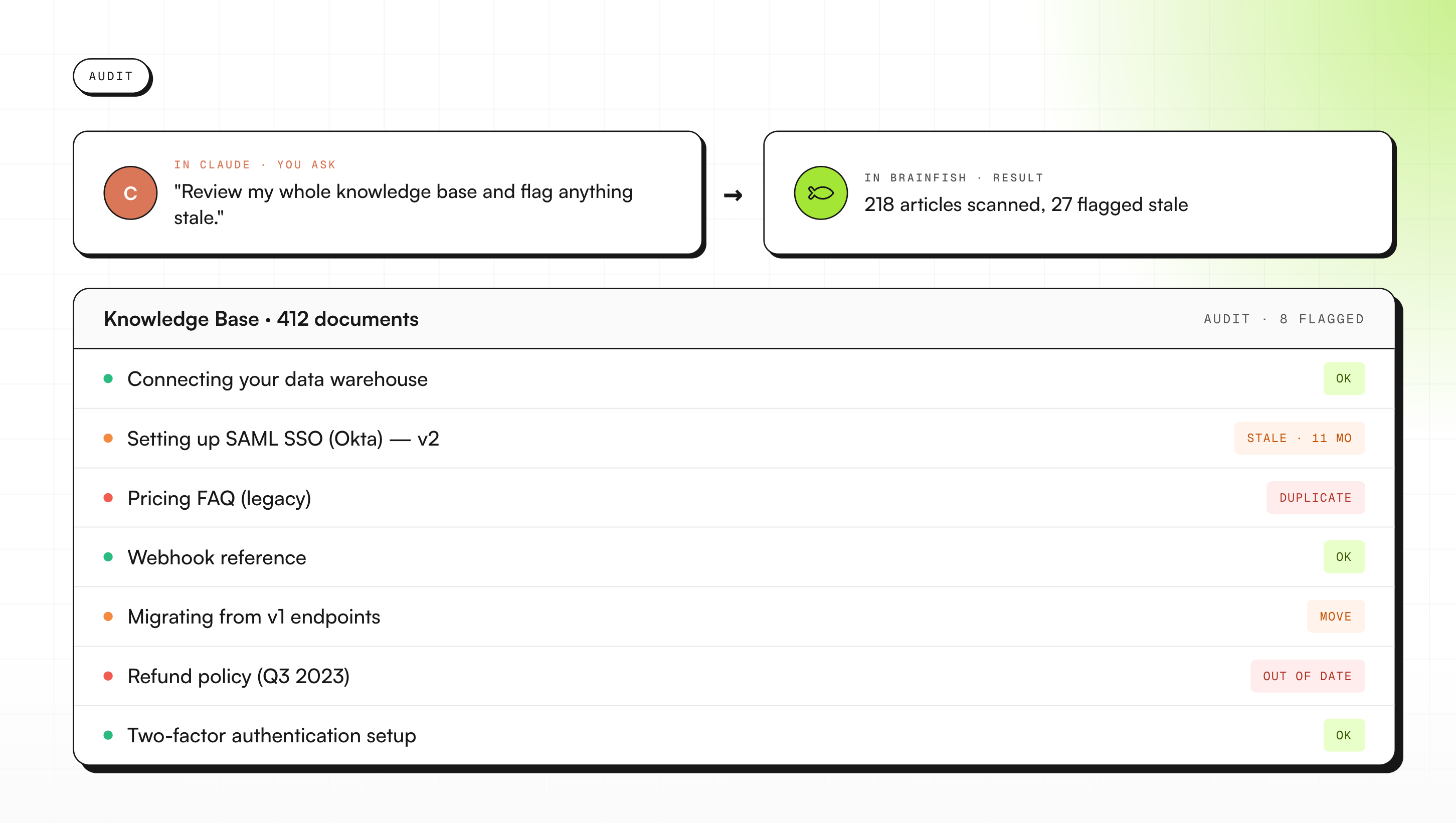
The first thing he did was inventory the workspace. Using the "list_collections" and "list_documents" tools via Claude, he pulled every collection and document, spotted duplicates, flagged stale content, and identified articles that needed to be moved or deleted. All in one conversation.
"Without MCP I'd have been clicking through the platform manually," he said. "Now I run the whole thing in one conversation."
A knowledge base review that used to take two weeks took an afternoon.
2) Cleaning up information architecture
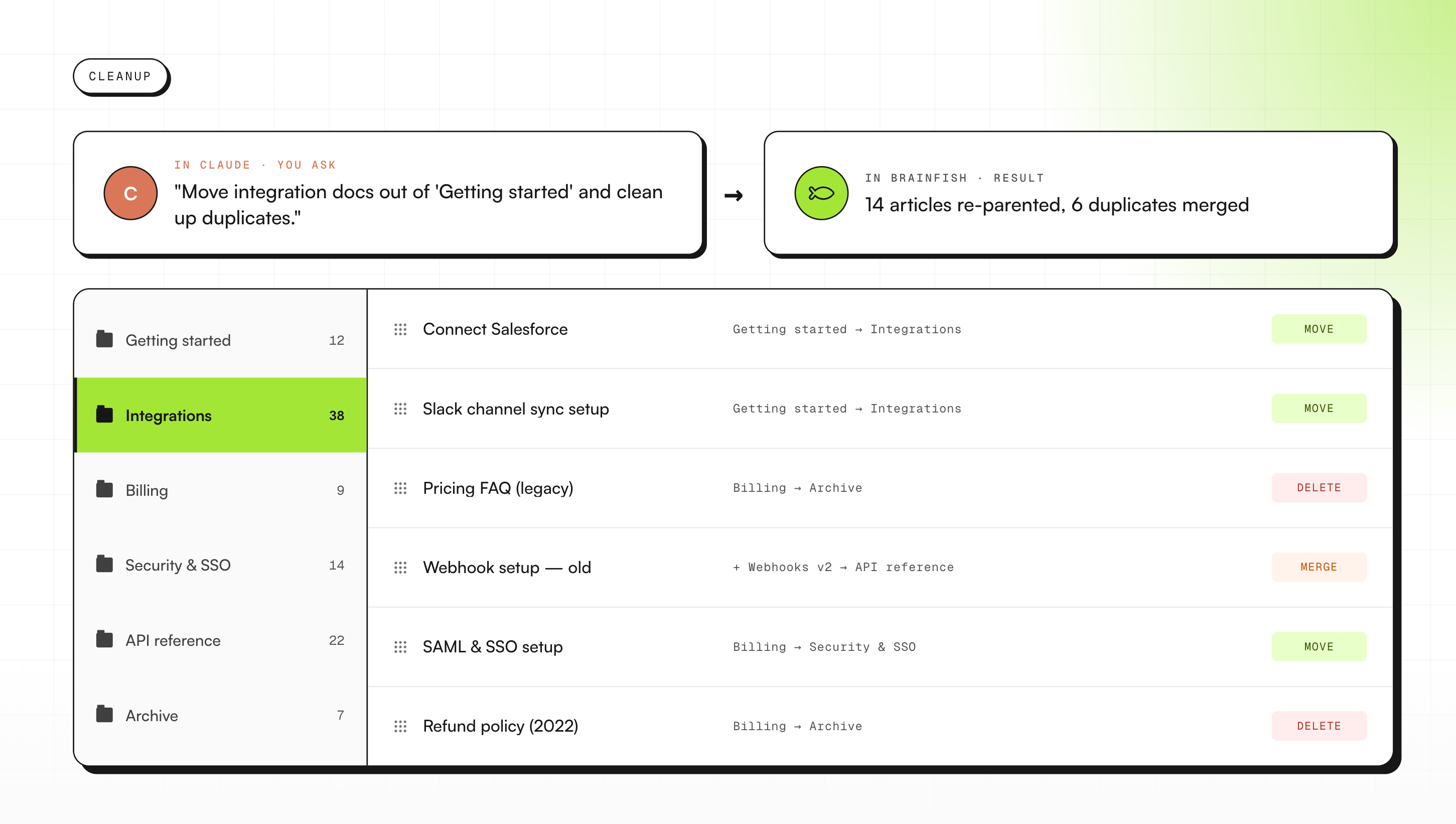
After the audit came the cleanup. IA work is the kind of thing that stays on the backlog forever. Pulling every document, checking metadata, understanding structure, deciding what moves where, it all requires too much manual overhead to do regularly. With MCP, Neville pulled the documents into Claude, checked metadata, and batch-flagged articles to move or delete in a single session.
3) Coverage testing: finding gaps before customers do
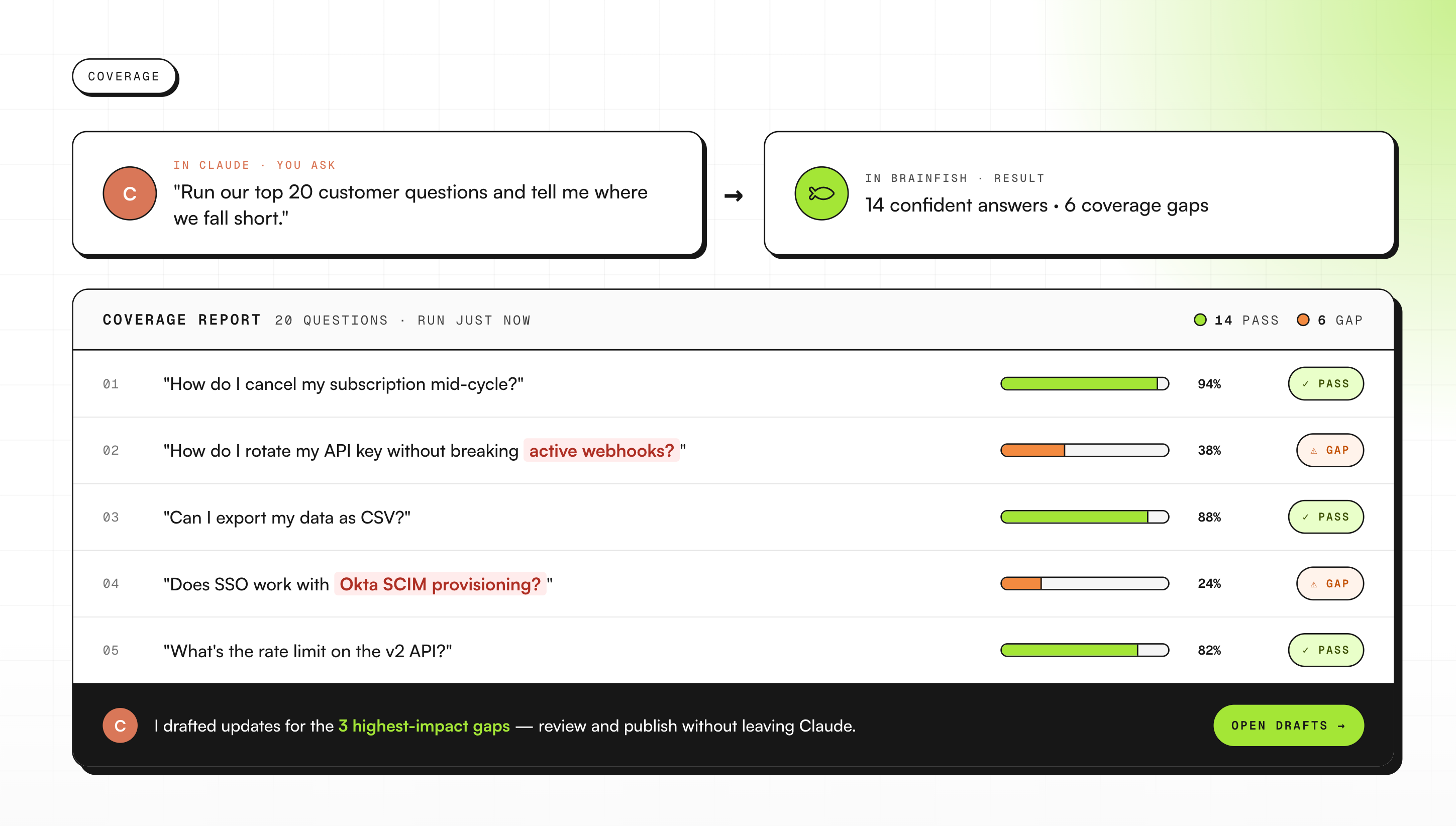
Neville uses the "brainfish_generate_answer" tool to fire test questions at the knowledge base and check what customers would actually get back. Not what an article says in isolation, but what the AI surfaces when someone asks the question in practice.
For support and knowledge teams, this one has obvious ROI. You find the articles that sound complete but don't hold up under a real question. You find them before a customer does.
4) Turning meeting notes into published articles
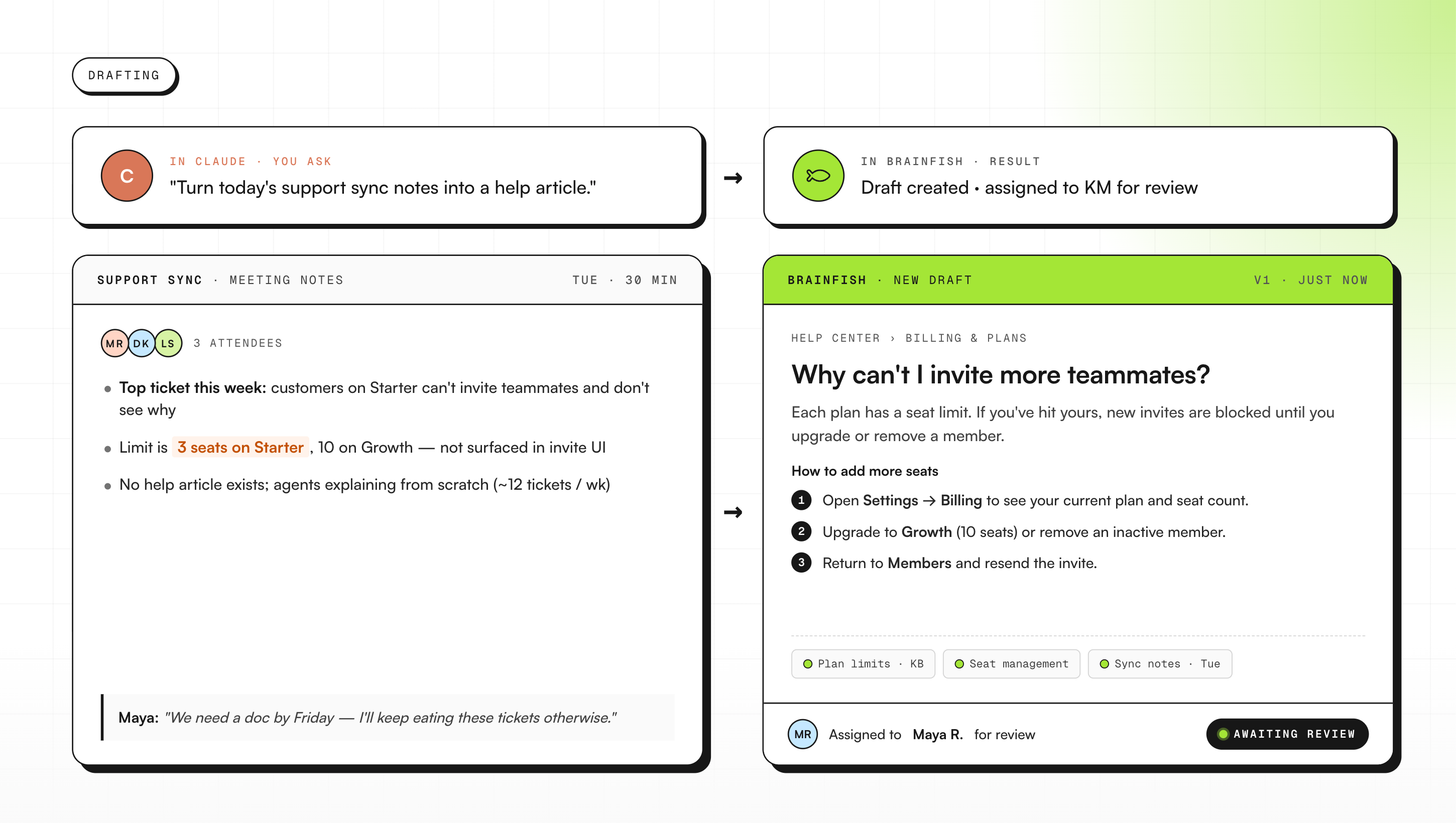
When a product update gets discussed in a meeting, Neville feeds the notes into Claude and asks it to draft a Brainfish article. Claude pushes the draft straight into Brainfish for review.
"No copy-pasting between tools," he said. The article goes from meeting note to draft in review in one conversation.
B2B fintech: Real-time coaching for CS agents
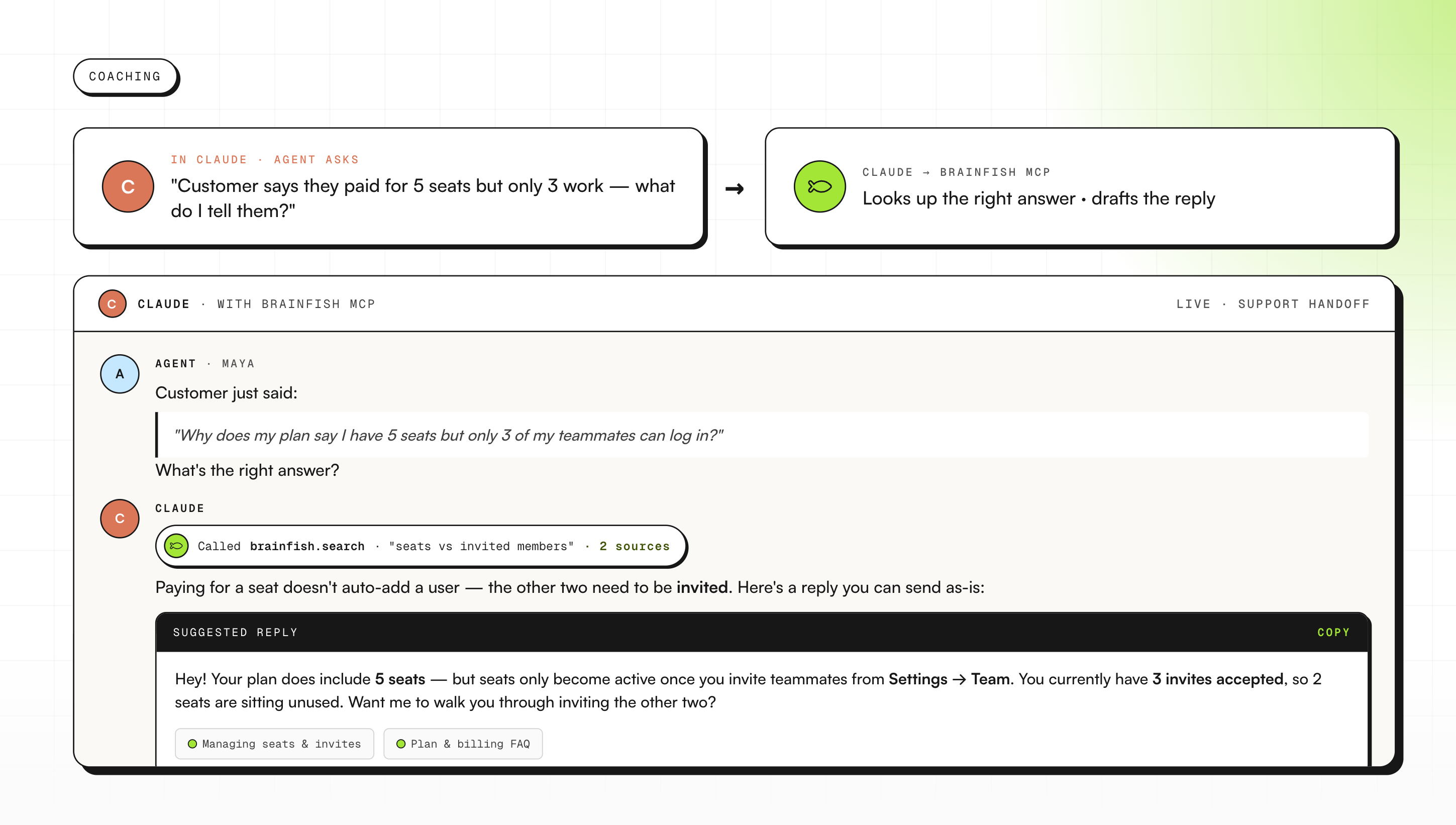
A B2B fintech company's customer success team wanted a way to support agents during live customer conversations without making them tab between three documents. What they built is a "if they say this, you say that" guide grounded live in the Brainfish knowledge base, surfaced inside Claude.
A CS agent can be on a call, type a summary of what the customer just said, and get back a response suggestion built from actual Brainfish content. The specific article, the specific answer, in the moment.
SaaS social platform: Updating the knowledge base without leaving Claude
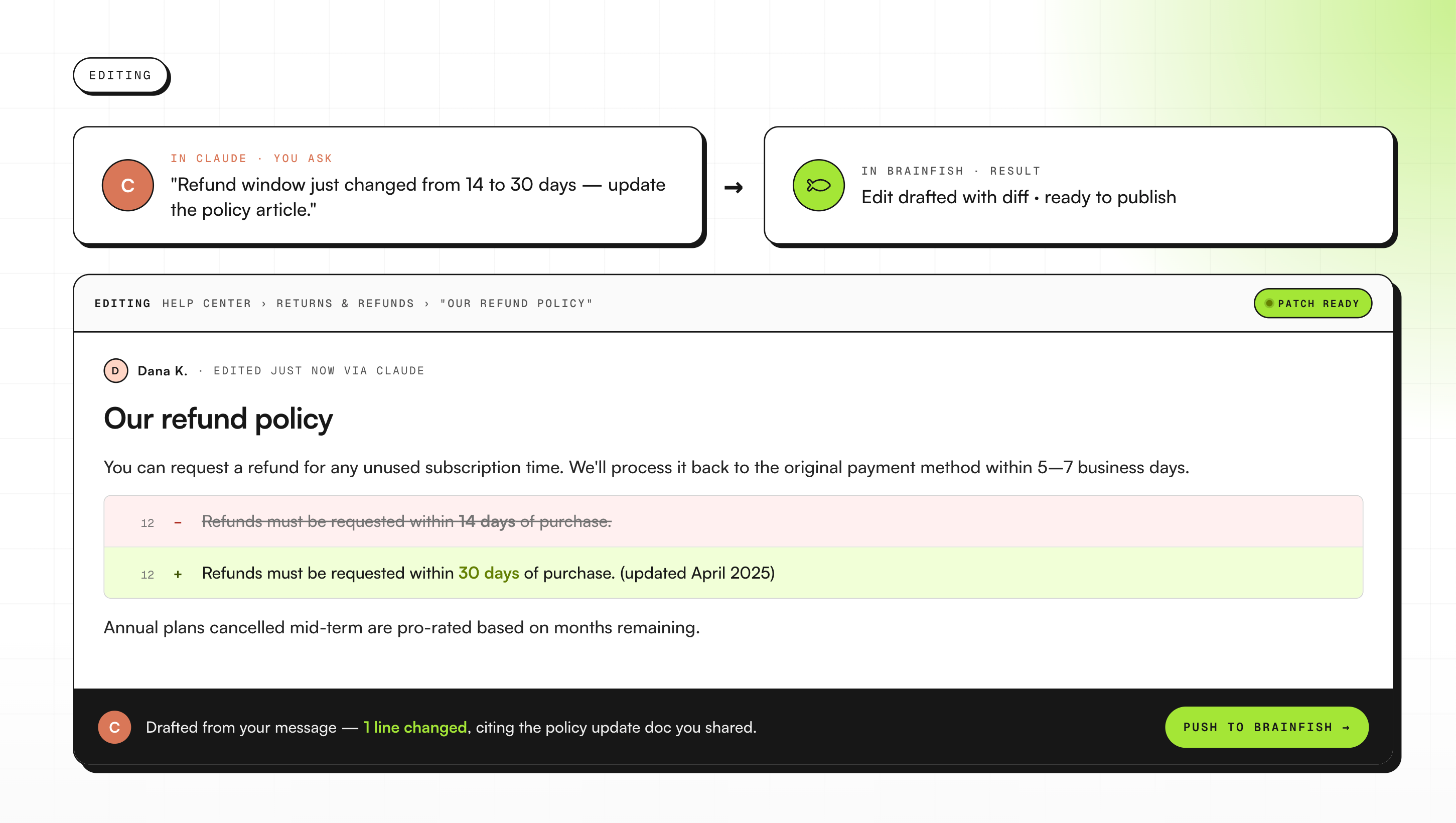
A SaaS social platform's engineer asked in their shared channel whether Claude could write and update articles via the API. The use case they had in mind was using Claude to draft and update Help Center content without switching tools.
That's what they're doing now. A draft gets written inside Claude, grounded in the existing knowledge base, and pushed into Brainfish for review. The knowledge base stays current without anyone needing to open the platform to do it.
Enterprise AI platform: A documentation workflow built on two agents
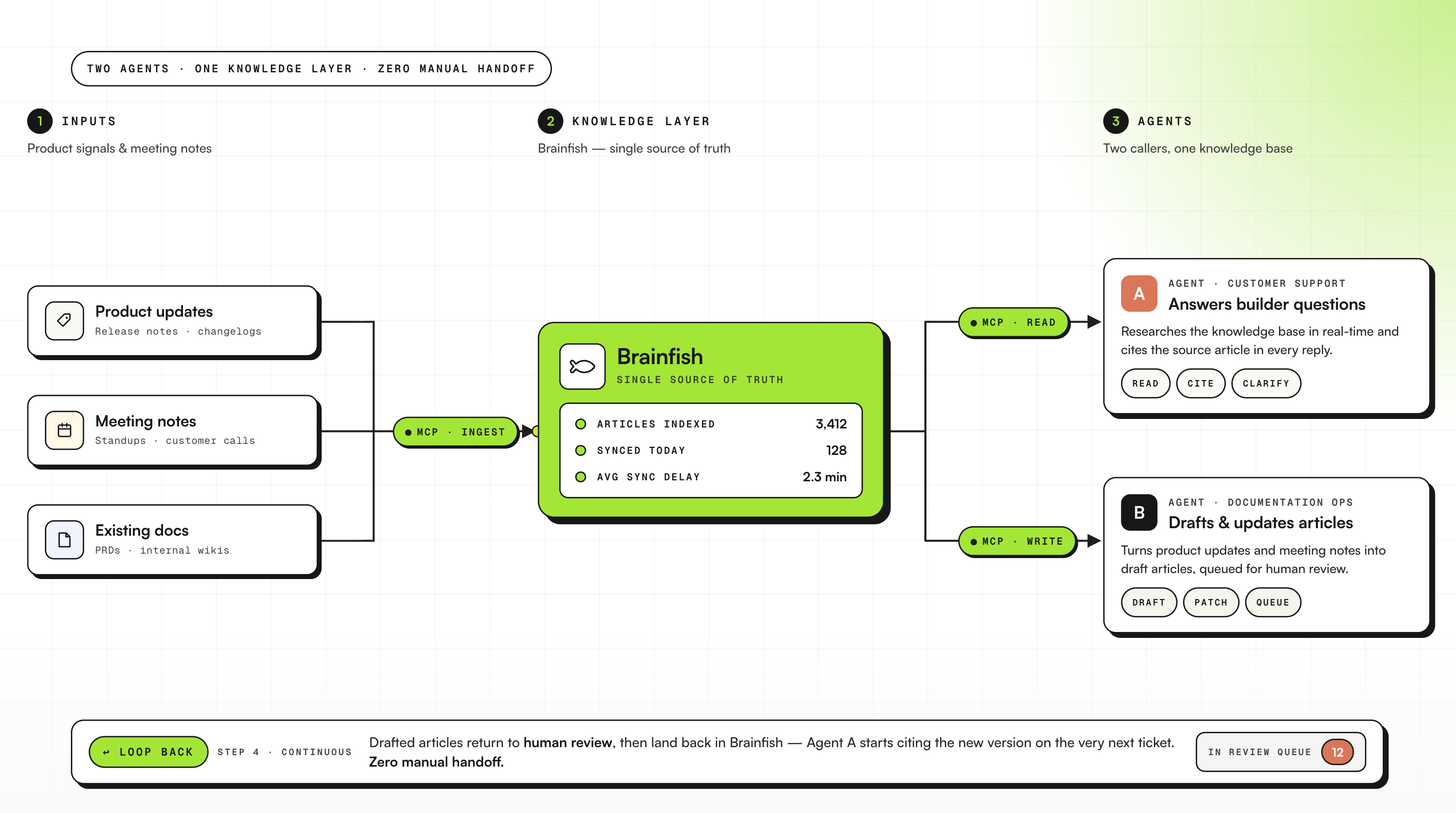
An enterprise AI platform uses Brainfish as the knowledge layer for their builder community. Their setup runs two agents: one handles customer-facing support, and a second is dedicated to documentation workflows. Both call Brainfish for research.
Product updates and meeting notes go in as inputs. Brainfish articles come out the other end, directly into review. For a team whose builder community depends on accurate, current documentation, it means the knowledge base keeps pace with the product without a manual handoff in between.
What these teams have in common
None of these teams restructured how they work. Neville ran a full knowledge base audit last week. The B2B fintech company has the CS coaching guide running. The SaaS social platform is drafting and updating articles via Claude. The enterprise AI platform is running the dual-agent architecture in production.
They're doing work that already existed on their plates, just without the overhead of doing it manually.
How to get started
If you're a Brainfish customer who has started using Claude, setup takes under 60 seconds. The full setup guide is here.
If you're not a Brainfish customer yet and you're building your support and CS workflow around Claude, this is where to start.
Want to learn more about Brainfish?
Meet with the team to learn more + get 2 week free trial.
1) What is Brainfish MCP?
Brainfish MCP is a Model Context Protocol (MCP) server that connects Claude directly to your Brainfish knowledge base. Once connected, Claude can pull in Brainfish content as context, search and read articles, and help draft and update documentation workflows without you switching tools.
2) What can Claude do once Brainfish MCP is connected?
Teams use Claude to do things like:
- Audit a whole knowledge base (list collections/documents, spot duplicates, flag stale content).
- Clean up information architecture (review metadata, decide what to move/delete in batch).
- Run “coverage tests” by asking questions and checking what the AI actually returns to customers.
- Turn meeting notes and product updates into draft Brainfish articles pushed straight into review.
3) Is Brainfish MCP safe for internal or customer data?
It’s designed for teams who need to work with real internal knowledge safely: Claude only has access to whatever your Brainfish connection and permissions allow. In practice, teams use it for customer-facing help content and internal enablement because it keeps answers grounded in the same source of truth your org already maintains.
4) Who typically uses Brainfish MCP (support, CS, product, engineering)?
The common pattern is “anyone responsible for keeping product knowledge accurate.” In this article, that includes:
- Support & knowledge teams (coverage testing and keeping the help center current)
- CS teams (real-time coaching during live conversations)
- Product & engineering (turning updates and meeting notes into docs, maintaining technical/help content)
5) How long does setup take and what do I need?
Setup takes under 60 seconds. You add a custom connector in Claude at claude.ai/settings/integrations, point it at https://mcp.brainfi.sh, and authenticate with your Brainfish API token. After that, you can search, read, draft, and audit Brainfish content directly in Claude.

Daniel is a product and customer experience leader with over a decade of experience solving user experience challenges at scale. As CEO of Brainfish, he is redefining how users interact with technology - championing a new era of proactive, AI-driven support that anticipates user needs before they arise