
Your team spent months building a knowledge base. Decisions about terminology, escalation paths, which article covers which edge case. Your most experienced people, distilled into documentation. And for most of that time, that knowledge lived in one place: a tab in a browser that someone opened when they remembered to, and closed when they were done. The knowledge was good, but the problem was where it lived, and that's the part that changes today!
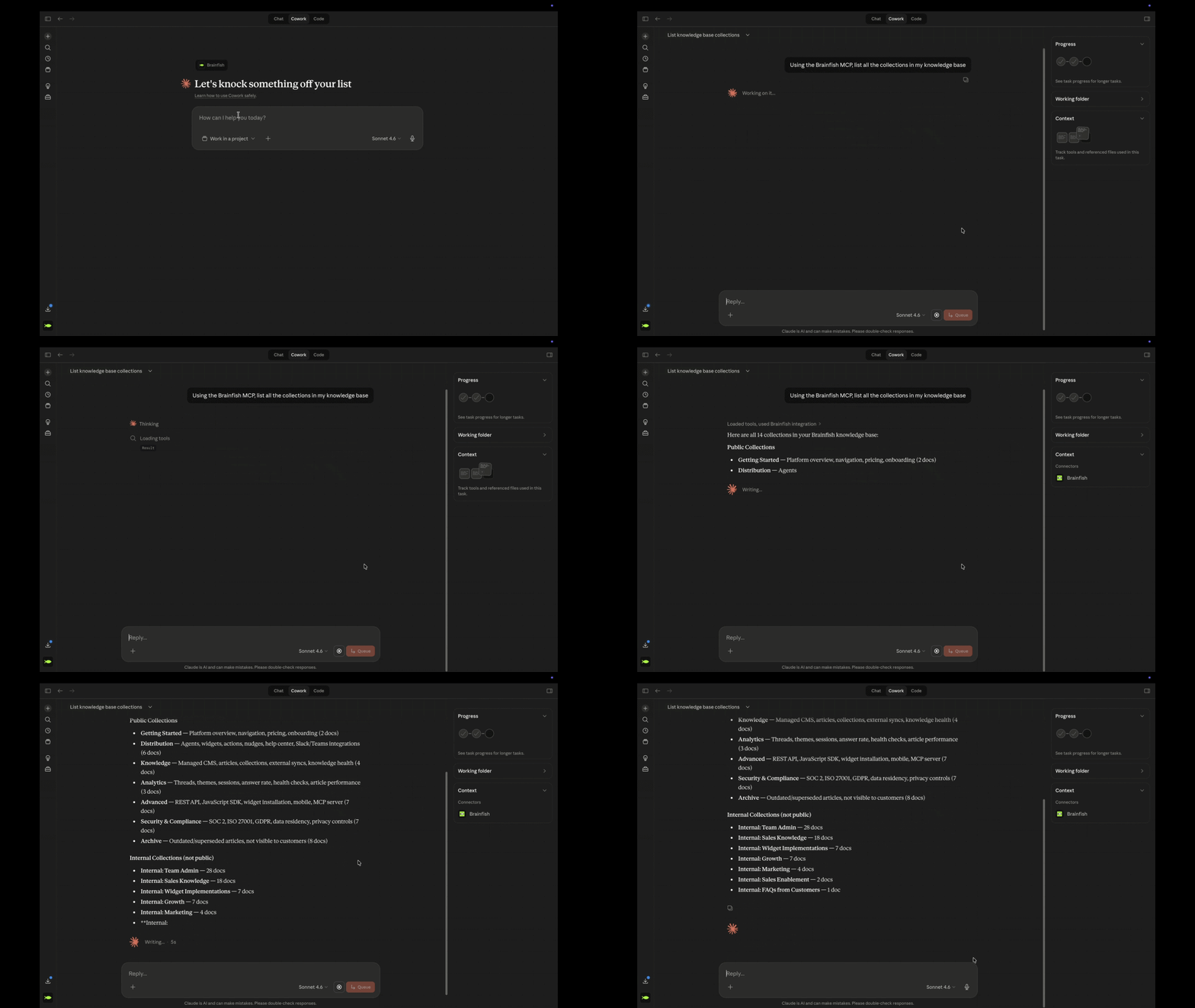
Brainfish MCP connects Claude, Cursor, and VS Code Copilot directly to your knowledge base: search it, draft into it, audit it, and update it, all inside the same conversation. Claude.ai users connect via OAuth in under 60 seconds.
How Teams are Using the Brainfish MCP
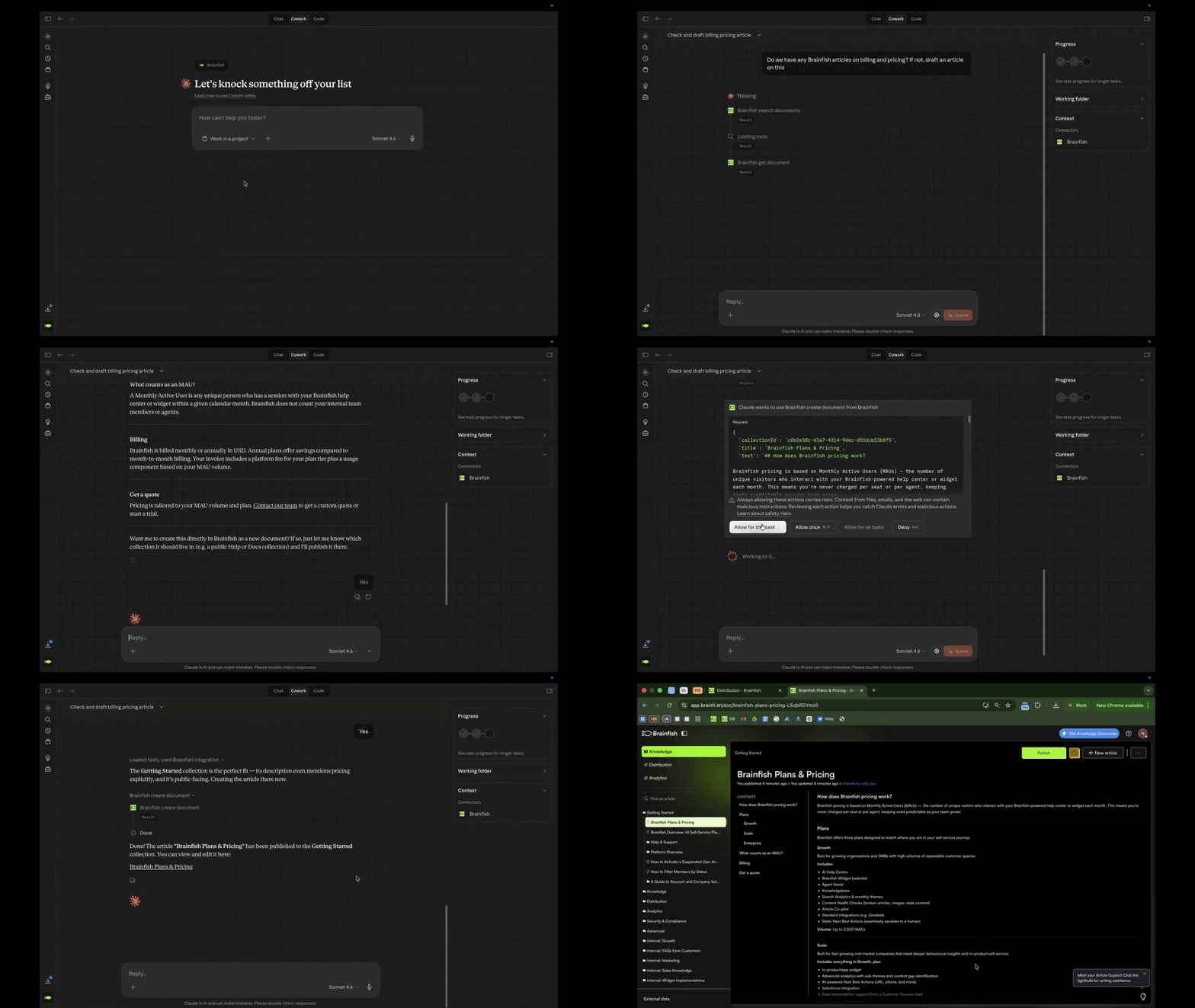
- One SaaS social platform's engineer asked whether Claude could write and update articles via the API. They're doing it now, keeping their help center current with every product update without leaving Claude.
- A B2B fintech company is building a real-time conversation guide for their CS team, grounded live in Brainfish, so agents have the right answer in the moment without tabbing between docs.
- Internally, our team runs knowledge base audits, information architecture cleanup, and coverage testing through MCP without opening the platform once. "Without MCP I'd have been clicking through the platform manually."
Now You Can
- Ask Claude what's missing from your knowledge base and fix it in the same chat.
- Turn a meeting note into a published article without switching tools.
- Audit thousands of articles in a single conversation and find the gaps before customers do.
The knowledge base stops being something you maintain separately on a quarterly schedule and starts being something you operate on from wherever you're already working.
Your Knowledge, Wherever It Lives
But that knowledge probably doesn't all live in Brainfish yet.
Most teams have documentation scattered across Confluence, Google Drive, Notion, Guru, Helpjuice, and a dozen other tools they've accumulated over the years. Brainfish has been syncing from all of it without asking anyone to migrate or rebuild anything. The upstream is already handled. MCP is what makes the downstream actionable: your knowledge, wherever it already is, now reachable from inside Claude.
What makes every answer downstream more accurate is that Brainfish automatically reads your knowledge base to build a structured understanding of your business: your products, your terminology, the specific meaning of words like "refund" or "onboarding" at your company. That context is synced to every agent, so the answers your customers get are grounded in how your business actually works and not what a generic model assumes. And because the quality of everything depends on what's actually in the knowledge base, the review workflow gets better too: the screen that surfaces content suggestions now shows your team the reasoning behind every flag, so approvals take less time and your team trusts what they're acting on.
The Same Answers, Now in Microsoft Teams
The same knowledge your team is now operating on through Claude is also reaching them through Microsoft Teams. Your team mentions @brainfish in a channel, gets a grounded answer in-thread, and the question doesn't become a DM to the one person who happens to know. New joiners find answers without pinging managers. Support teams stay in their queue instead of context-switching. The Teams integration brings that same motion to enterprise organisations that run on Microsoft: same @mention workflow, same cited answers in-thread, same admin controls over which channels it's active in, separate attribution in analytics. If your organisation runs on Microsoft rather than Slack, Brainfish now works the same way inside your channels.
Inside Every Conversation Your Team Is Already Having
When a support agent is mid-ticket, the knowledge they need to answer accurately is often in three different tabs. Brainfish's Internal AI Copilots surface the right article at the right moment inside the conversation the agent is already handling: no search, no tab-switching, the answer finds the agent rather than the other way around. Sales teams use it for demo prep. CS teams use it for live call guidance. The same knowledge base, showing up exactly when someone needs it, without them having to go find it.
For teams operating inside HubSpot or Salesforce, Brainfish AI Actions pull from live CRM data to answer questions without the agent leaving the conversation. The customer's history, their tier, their open tickets: all accessible in context rather than requiring someone to open a second window and look it up separately.
Brainfish also surfaces customer friction automatically through Proactive Nudges, flagging the moments customers got stuck or where answers fell short, summarised for your team without anyone needing to file a report or run a manual audit. The product tells you where the knowledge gaps are before they compound.
What Happens When AI Can't Resolve It
Every team deploying AI support eventually faces the same question from enterprise buyers: what happens when the AI can't resolve something? Most tools answer with a dead end. The customer asks for a human, gets transferred to a queue, and starts the conversation from scratch. Every detail they just shared is gone. Your agent starts blind and resolution takes longer. Zendesk Live Agent Handoff is the direct answer to that question. When a customer needs a human, the transition happens inside the same chat window with the full conversation already in front of your Zendesk agent. No starting over, no repeating, no context lost between the AI response and the human who closes it.
For Developer-Facing Teams
For teams with a developer-facing product, API Docs for Help Center brings the full technical reference into the same destination customers use for support content. Connect your OpenAPI spec, surface an interactive API reference with a live HTTP client for inline testing, and give developers one place to find the right endpoint and the right support article with conversational search across both.
The Same Logic Behind Every Release
Every release here follows the same logic. The knowledge your team has built, working in every tool they already have open: Claude, Teams, Zendesk, Slack, HubSpot, Salesforce, Confluence, Google Drive. Not a new platform to manage or a replacement for anything in the stack. The layer that makes every tool your team is already using smarter about your product.
First answer, right answer. In every tool your team already works in.
Ready to see Brainfish in action? Request a demo here.
What is Brainfish MCP and what does it do?
Brainfish MCP is a Model Context Protocol server that connects Claude, Cursor, and VS Code Copilot directly to your Brainfish knowledge base. From inside your AI assistant, you can search articles, draft new content, audit for gaps and stale content, and push updates back to Brainfish — all without leaving the conversation. Claude.ai users connect via OAuth in under 60 seconds.
How do I use Claude to update my knowledge base?
With Brainfish MCP connected, you can ask Claude what's missing from your knowledge base and fix it in the same chat. You can turn a meeting note into a published article, audit thousands of articles in a single conversation, or identify coverage gaps before customers do — all from inside Claude without switching tools.
Does Brainfish work inside Microsoft Teams?
Yes. @mention Brainfish in any configured Teams channel and get a grounded, cited answer in-thread, right where the question was asked. It uses the same @mention workflow as the Brainfish Slack integration, with admin-controlled channel scoping and separate attribution in analytics.
What happens when Brainfish AI can't resolve a customer support question?
With Zendesk Live Agent Handoff, the customer is transferred to a live Zendesk agent inside the same chat window. The full AI conversation transcript transfers automatically, so the agent starts mid-thread with full context rather than from zero. Customers never have to repeat themselves and agents never start blind.
What knowledge sources does Brainfish sync from?
Brainfish syncs from Confluence, Google Drive, Notion, Guru, Helpjuice, OpenAPI specs, and your website, among others. It doesn't require teams to migrate or rebuild anything — it reads from wherever the knowledge already lives.
What is Brainfish's Internal AI Copilot?
Internal AI Copilots surface the right knowledge base article at the right moment inside the conversation a support agent or sales rep is already handling. No searching, no tab-switching — the answer finds the agent rather than the other way around. CS teams use it for live support. Sales teams use it for demo prep.
Does Brainfish integrate with HubSpot or Salesforce?
Yes. Brainfish AI Actions pull from live CRM data to answer questions without the agent leaving the conversation. The customer's history, tier, and open tickets are all accessible in context without opening a second window.
What is API Docs for Help Center?
API Docs for Help Center connects your OpenAPI spec to Brainfish, surfacing a full interactive API reference with operation detail views and a live HTTP client alongside your support content. Developers get one destination for both the technical reference and support articles, with conversational search across both.