

What "building an AI knowledge base" actually means
Quick answer: Building an AI knowledge base involves auditing your existing content, structuring it for machine retrieval through semantic chunking and metadata tagging, connecting it to your AI systems, and setting up automatic update cycles. The steps most teams skip (freshness detection and conflict resolution) are what determine whether the knowledge base performs in production or degrades within weeks of launch.
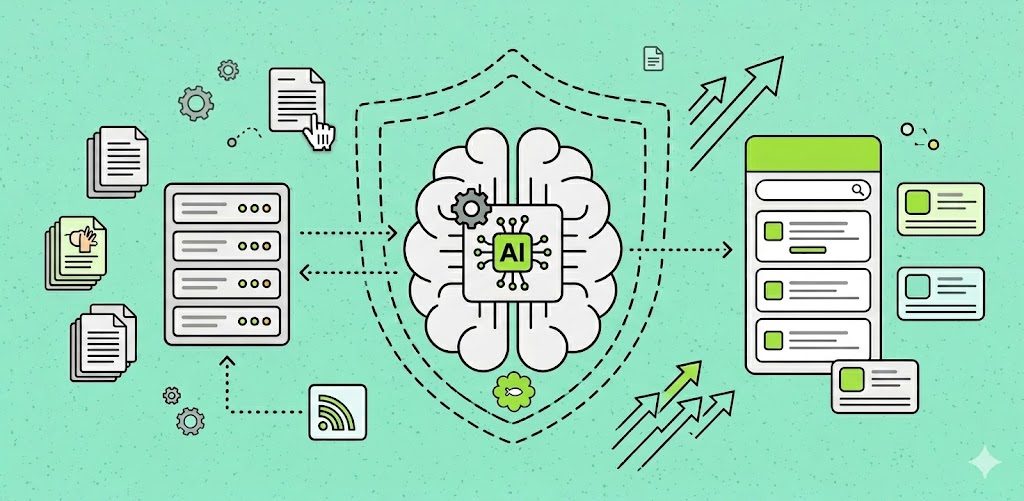
An AI knowledge base is not a folder of articles you upload to a chatbot. It is a structured, continuously maintained retrieval system that AI agents, copilots, and self-service tools query in real time to answer questions accurately.
The distinction matters because the goal of a traditional knowledge base is human readability: clear headers, scannable bullets, good search. The goal of an AI knowledge base is machine retrievability: semantic accuracy, freshness, conflict resolution, and structured metadata. These are different engineering and content problems.
Most knowledge base failures happen because teams treat them as the same problem.
Related reading: What Is an AI Knowledge Base? The Complete Guide - the foundational definition before diving into the build.
Step 1: Define what your AI needs to know
Before ingesting a single document, define the scope of knowledge your AI system needs to function correctly. The questions to answer:
- What queries will users ask? Start with your top 20 support ticket categories, your most-searched help centre terms, or your most common inbound questions. These define the minimum viable knowledge scope.
- Who is the AI serving? A customer-facing AI agent, an internal support copilot, and a developer assistant need different knowledge: different tone, different technical depth, different audience segmentation. Define this upfront.
- What actions does the AI need to execute? If your AI agent doesn't just answer questions but also performs actions (updating account settings, submitting a ticket, escalating to a human), map the knowledge required to execute each action correctly.
Scope creep is one of the most common failure modes. Teams try to ingest everything at once, end up with a bloated, poorly structured knowledge base, and then wonder why retrieval accuracy is low. Start with the knowledge that covers your highest-volume use cases and expand deliberately.
Step 2: Audit your existing content
Most companies already have knowledge. It's just scattered, inconsistent, and not structured for AI retrieval. A content audit before you start building prevents you from structuring bad knowledge at scale.
For each knowledge source, assess:
- Accuracy: Is the content current? Does it reflect how the product actually works today?
- Coverage: Which high-frequency queries have no article? These are gaps the build needs to fill.
- Duplication: Are there multiple articles covering the same topic inconsistently? Duplicates and contradictions confuse retrieval.
- Format: Is the content structured in a way that can be chunked semantically? Long, meandering articles need to be split before ingestion.
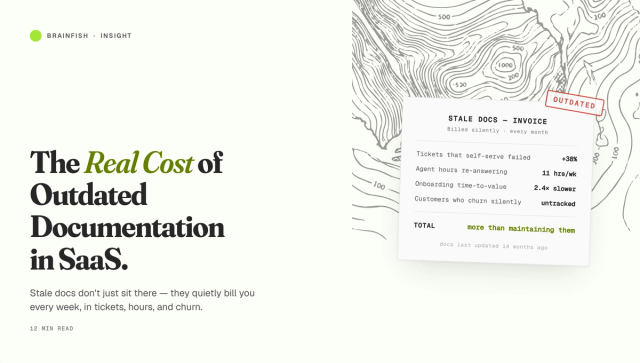
The audit takes time, but it is the investment that determines whether your AI knowledge base starts with a solid foundation or inherits the maintenance debt of a help centre nobody has touched in six months. For more on what that maintenance debt costs, see The Hidden Cost of Help Doc Debt.
Step 3: Identify and connect all your knowledge sources
The most valuable knowledge in your organisation is rarely in your official help centre. It's in:
- Call recordings (Gong, Chorus, or Avoma transcripts contain product explanations, objection handling, and edge-case resolution that never makes it into documentation)
- Support tickets (resolved tickets are a map of what customers actually struggle with and how your team actually resolves it)
- Internal wikis (Confluence, Notion, and Google Drive contain institutional knowledge that agents rely on but customers can never access)
- Slack and Teams (specialist knowledge that lives in conversations, not documents)
- Product documentation (changelogs, release notes, API docs)
An AI knowledge base that only ingests help articles will always have gaps at exactly the moments that matter most. Connect your full knowledge graph, not just the parts that were already formatted for a help centre.
Related reading: What Is an AI Agent Knowledge Base? - how agents use structured knowledge versus how humans browse it.
Step 4: Structure your content for machine retrieval
This is the step that most teams either skip or do poorly. Raw documents, even well-written ones, are not ready for AI retrieval. They need to be structured for the way machines query knowledge.
Semantic chunking
Documents need to be divided into semantically coherent chunks, not split by character count or paragraph number. A chunk should map to a single concept, procedure, or fact. A chunk that contains half a setup procedure and half a billing policy will confuse retrieval and produce inaccurate answers.
The right chunk size depends on the content. A complex technical procedure might be one chunk per step. A FAQ article might be one chunk per question-answer pair. The goal is that each chunk, retrieved in isolation, is sufficient to answer the query that would retrieve it.
Metadata tagging
Every chunk should carry metadata: source document, last updated date, product area, audience (customer, internal agent, developer), version, and confidence level where applicable. Metadata is what allows the retrieval system to filter by context: returning a different answer to an enterprise customer than a starter-plan user, or a different answer to an internal agent than to an end customer.
Without metadata, all knowledge looks equally authoritative regardless of how current or relevant it is.
Deduplication and conflict resolution
Before knowledge reaches the index, the system needs to identify duplicate content and conflicting answers. Duplicates inflate the index and dilute retrieval precision. Conflicts (two articles that say different things about the same feature) are more dangerous: the AI will retrieve whichever is ranked higher, not whichever is correct.
RAG accuracy degradation in production is one of the most commonly misdiagnosed knowledge base failures. Teams assume the retrieval model is underperforming when the actual problem is contradictory content in the index.
Step 5: Set up freshness detection and automatic updates
A knowledge base that doesn't stay current is worse than no knowledge base. It delivers wrong answers confidently, at scale, without any visible signal that something is broken.
Manual update cycles don't work at scale. A team shipping weekly features cannot rely on a writer noticing a help article is outdated and manually updating it before the wrong information reaches a customer or AI agent.
What works is automatic freshness detection: a system that monitors the source content (product documentation, help articles, internal wikis) for changes, and either regenerates affected knowledge chunks automatically or flags them for review before the AI can retrieve stale content.
This is the capability that most distinguishes knowledge bases that improve over time from knowledge bases that degrade over time. If you are evaluating AI knowledge base tools, this is the most important question to ask: how does freshness detection work, and what happens when source content changes?
Step 6: Connect the knowledge base to your AI systems
A knowledge base that isn't connected to the systems your team and customers actually use delivers no value. The integration layer is where the knowledge base becomes operational.
Common integration points include:
- AI agents and chatbots (the knowledge base is the retrieval layer that grounds the agent's answers in accurate, current product knowledge)
- Agent assist tools (a sidebar in Zendesk, Intercom, or Salesforce Service Cloud that surfaces relevant knowledge to human agents in real time as they work a ticket)
- Self-service portals (an in-app widget or public help centre powered by AI retrieval rather than keyword search)
- Slack and internal tools (a bot that answers internal team questions using the same knowledge base that powers customer-facing AI)
The goal is a single knowledge source that powers all channels, not separate knowledge bases maintained independently for each tool. See how Brainfish integrates with the tools your team already uses, including Zendesk, Intercom, Salesforce, Slack, and HubSpot.
Step 7: Test retrieval quality before going live
Before your AI knowledge base touches real users, test it systematically. The testing framework that matters:
Coverage testing: Map your top 50 inbound queries to the knowledge base. What percentage can the system answer accurately? What are the gaps?
Accuracy testing: For queries with known correct answers, score the responses. Are they factually correct? Are they drawing from current content?
Audience segmentation testing: If your knowledge base is segmented by audience, test that the right knowledge reaches the right user. An enterprise customer should not receive the same answer as a starter-plan user if the feature works differently for each.
Edge case testing: Test the queries you don't want to go wrong (pricing questions, feature availability by plan, data privacy and security questions, escalation triggers). These are the queries where a wrong answer has the highest cost.
Step 8: Measure performance and iterate
Building is not a one-time event. An AI knowledge base needs ongoing measurement to catch degradation early and improve retrieval quality over time.
The metrics that matter:
- Self-service resolution rate (the percentage of queries that the AI resolves without a human handoff). Deflection isn't resolution. A query that gets deflected to a human is not a success.
- Confidence score distribution (are confidence scores clustered high (good retrieval) or spread low (knowledge gaps, poor chunking)?)
- Escalation rate (a rising escalation rate on previously handled topics signals knowledge staleness or a gap in coverage)
- Re-open rate (tickets or queries that are resolved but then re-opened often indicate the knowledge base is serving partial or outdated answers)
- Query coverage (what percentage of incoming queries are matched to knowledge? Unmatched queries are a map of your knowledge gaps)
Schedule a quarterly knowledge audit: not just a content review, but a retrieval quality review. Run the top queries against the knowledge base, check accuracy against the current product, and
Where Brainfish fits (example implementation)
If you're evaluating tools while following the steps above, it helps to map them to a real production setup.
Brainfish's Knowledge Layer is designed for the hard parts most teams struggle with after the initial build:
- Ingestion across sources: connect help docs, internal wikis (Notion, Confluence, Drive), Slack, and support systems so your knowledge base reflects where knowledge actually lives.
- Semantic structuring: chunking and metadata so answers retrieve the right level of detail and can be filtered by audience, plan, or context.
- Freshness detection: monitoring and updating knowledge as the product changes so answers do not silently drift out of date.
- Multi-channel delivery: the same knowledge layer can power an in-app experience, a customer-facing agent, and agent assist inside your support stack.
The goal is not "add AI to your help center". It's to build a knowledge layer that stays accurate as you ship identify both stale content and coverage gaps.
The mistake most teams make
The most common failure when building an AI knowledge base is treating it as a one-time migration rather than an ongoing infrastructure investment.
Teams spend time on the initial build, get the knowledge base working, and then stop. The product ships. The knowledge doesn't update. Answers drift. Accuracy degrades. The AI starts confidently delivering wrong answers, and the team loses trust in the whole system.
The teams that get lasting value from their AI knowledge bases treat freshness and retrieval quality as infrastructure, the same way they treat their database backups or their test coverage. It's not something you set and forget. It's something you monitor, measure, and maintain.
Brainfish's Knowledge Layer is built around this principle: automatic ingestion, freshness detection, and multi-channel delivery so knowledge stays current as your product evolves, without a manual update cycle that breaks down at scale.
Related reading: AI-Powered Support: Best Practices for a Customer-Centric Approach - how this build process applies specifically to support teams.
Key takeaways
- Start by defining scope: what queries does your AI need to handle, for which audiences, and with what actions?
- Audit existing content before ingesting it: stale, contradictory, or poorly structured content produces bad retrieval at scale
- Connect all your knowledge sources, not just help articles: call recordings, support tickets, internal wikis, and Slack history contain the knowledge that matters most
- Semantic chunking, metadata tagging, and conflict resolution are the structural steps that most teams skip, and the ones that most determine retrieval quality
- Automatic freshness detection is the capability that separates knowledge bases that improve over time from those that degrade
- Measure resolution rate, confidence scores, and query coverage, not just "is the knowledge base live"