Posts

Stop the Epidemic! Knowledge Base Crash Out is on the Rise

Published on

November 10, 2025

Bubble
Bubble
Bubble
Bubble
Bubble
Bubble
Bubble
Bubble
Bubble
Bubble
Bubble
Bubble
Bubble
Bubble
Bubble
Bubble
Bubble
Bubble
Bubble
Bubble
Bubble
Bubble
Stop the Epidemic! Knowledge Base Crash Out is on the Rise

With Brainfish Knowledge Discovery, all you have to do is upload a video showing your new feature or update, and Brainfish automatically scans your knowledge base, flags outdated content, and suggests every edit that needs to be made. It’s the easiest way to keep your help center accurate, your team focused, and your customers confident they’re getting the right answers.

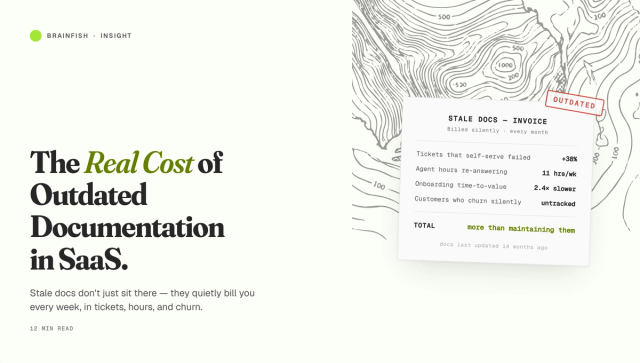
If your help center feels like a game of whack-a-mole, you’re not alone. Product updates move fast. Documentation doesn’t. And if that dramatic hook doesn’t keep you reading, we don’t know what will!

Back to product updates moving fast…one week it’s a new dashboard layout. The next, pricing changes. Then someone notices a help article still referencing a feature that doesn’t exist anymore. It’s chaos in slow motion. And customers feel it first (poor things).

According to Gartner, only 14% of customer service issues are fully resolved through self-service. Even the simplest ones barely break 36%. Most customers give up, open a ticket, or walk away frustrated because the information they find is wrong. So, so wrong.

Hence, the epidemic of Knowledge Base Crash Out (not a real medical epidemic, but we hope that’s obvious by now).

Diagnosing O.D.D (Outdated Doc Disorder)

Teams have been trying to solve documentation decay for years by creating more content. New help articles. New guides. New training videos.

But adding more words doesn’t fix what’s broken (ask my ex). The real problem isn’t content creation, it’s discovery of content that needs to be updated. It’s knowing which pages became outdated the moment your product changed, which screenshots are misleading, which pricing tables still quote last year’s plans.

This is where most teams fall behind (not on purpose, of course). And it’s why we built Knowledge Discovery.

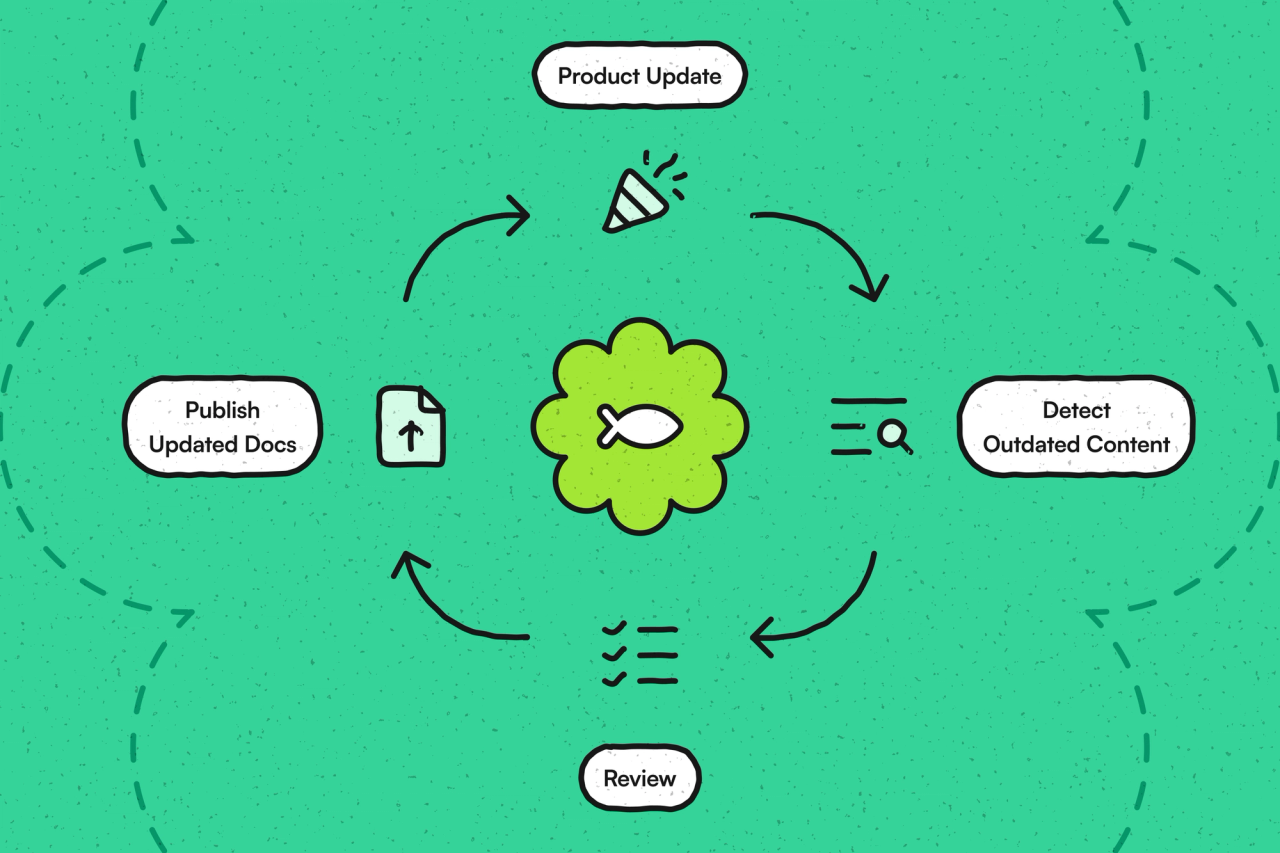
Instead of writing more, teams can now focus on keeping truth in sync. Upload a short walkthrough video or record a new feature demo, and Brainfish automatically scans your existing documentation. It identifies every article that references something that changed, flags those updates, and suggests revisions. You stay in control by reviewing, approving, and updating everything in one place. But wait, there’s more!

It’s like turning on a radar for your knowledge base. Suddenly, you can see where the problems are before your customers do (they’ll thank you for this. Or at least the grateful ones will).

Where Things Break (and How Knowledge Discovery Fixes Them)

Let’s make this super concrete.

Consider this real world scenario - the product team deprecates the “Classic Dashboard” and rolls out a new interface. Support knows they’ll spend hours searching every doc that mentions it, manually checking screenshots, and rewriting paragraphs that no one remembers owning. With Knowledge Discovery, they just upload a video explaining the change. Brainfish finds every outdated mention across the knowledge base, tags the proposed edits, and serves them up for one-click review.

Or take pricing updates. A new tier launches, and suddenly ten different articles, comparison tables, and upgrade FAQs need rewriting. Brainfish surfaces every one of them instantly. Instead of playing catch-up for a week, the team has it done in a morning. Boom, more time to enjoy that first coffee.

For support and CX teams, that means less time firefighting and more time creating value for customers. For product teams, it means launches stay aligned with documentation…no more “We shipped this two weeks ago, but the docs still show the old version BS.”

If that sounds like the system your team’s been waiting for, you can deep-dive into how Brainfish fits into both support workflows and product team operations (shameless plug).

Why This Matters More Than Ever * dramatic music *

Customer-facing teams today are being asked to do two contradictory things: deliver better service and spend less money. The McKinsey folks call it the “defining challenge for modern customer care”: leaders must improve experience while aggressively managing costs. But somehow it’s a tale as old as time.

Here’s the twist. While executives rush to adopt AI, customers are increasingly skeptical of it. Gartner did another fancy survey and found that 64% of consumers would prefer companies use less AI in customer service. TLDR; It was because too often it gets in the way of actually getting help. We all know there are some truly unhelpful AI chatbots out there. And there are two types of people - those who know what we’re talking about, and those who are liars.

This is the opportunity: the kind of AI that doesn’t replace people, but helps them prevent problems before they start. The kind that keeps documentation accurate so customers can actually trust what they read (ahem, we’re kind of talking about Brainfish here).

That’s what makes Knowledge Discovery different. It doesn’t write fluffy new content or “auto-update” blindly. It finds what’s broken, shows you exactly where, and helps you fix it…fast and furious (without the furious. And the 9 sequels).

And when your knowledge base is accurate, everything downstream improves: self-service rates, ticket deflection, customer satisfaction, even…brand trust.

A New Standard for Knowledge

The best documentation teams in 2025 won’t be defined by how many articles they publish, but by how consistently accurate those articles stay.

They’ll build discovery-first systems that spot outdated content automatically. They’ll keep humans in the loop so updates are always reviewed with context. They’ll manage the full lifecycle of their knowledge - from product change to article revision - with transparency and speed.

This shift is already underway. Brainfish users are combining AI Support Agents for instant answers, Proactive Nudges to prevent confusion before it happens, and Customer Analytics to see exactly where users get stuck. Knowledge Discovery completes that circle, making the system self-sustaining.

Behind the Scenes: The “Crash Out” Launch

To celebrate this release, we decided to have a little fun with the pain everyone knows too well. Our new launch video plays like a pharmaceutical ad parody, complete with a Knowledge Base Nurse diagnosing O.D.D. (Outdated Doc Disorder) and prescribing Knowledge Discovery as the cure.

Side effects may include fewer Slack pings, faster approvals, and the quiet satisfaction of a help center that finally keeps up with your product. The script captures the absurdity of living with outdated documentation…until now! Aha!

Get Your Dose

Knowledge Discovery is now available within Brainfish. You can see it in action, or read how customers like Smokeball and Circular are already transforming their self-service experience with Brainfish.

Because in 2025, it’s about discovering what needs to change before your customers do. And…scene.
import time
import requests
from opentelemetry import trace, metrics
from opentelemetry.sdk.trace import TracerProvider
from opentelemetry.sdk.metrics import MeterProvider
from opentelemetry.sdk.trace.export import ConsoleSpanExporter, SimpleSpanProcessor
from opentelemetry.sdk.metrics.export import ConsoleMetricExporter, PeriodicExportingMetricReader

# --- 1. OpenTelemetry Setup for Observability ---
# Configure exporters to print telemetry data to the console.
# In a production system, these would export to a backend like Prometheus or Jaeger.
trace.set_tracer_provider(TracerProvider())
tracer = trace.get_tracer(__name__)
span_processor = SimpleSpanProcessor(ConsoleSpanExporter())
trace.get_tracer_provider().add_span_processor(span_processor)

metric_reader = PeriodicExportingMetricReader(ConsoleMetricExporter())
metrics.set_meter_provider(MeterProvider(metric_readers=[metric_reader]))
meter = metrics.get_meter(__name__)

# Create custom OpenTelemetry metrics
agent_latency_histogram = meter.create_histogram("agent.latency", unit="ms", description="Agent response time")
agent_invocations_counter = meter.create_counter("agent.invocations", description="Number of times the agent is invoked")
hallucination_rate_gauge = meter.create_gauge("agent.hallucination_rate", unit="percentage", description="Rate of hallucinated responses")
pii_exposure_counter = meter.create_counter("agent.pii_exposure.count", description="Count of responses with PII exposure")

# --- 2. Define the Agent using NeMo Agent Toolkit concepts ---
# The NeMo Agent Toolkit orchestrates agents, tools, and workflows, often via configuration.
# This class simulates an agent that would be managed by the toolkit.
class MultimodalSupportAgent:
    def __init__(self, model_endpoint):
        self.model_endpoint = model_endpoint

    # The toolkit would route incoming requests to this method.
    def process_query(self, query, context_data):
        # Start an OpenTelemetry span to trace this specific execution.
        with tracer.start_as_current_span("agent.process_query") as span:
            start_time = time.time()
            span.set_attribute("query.text", query)
            span.set_attribute("context.data_types", [type(d).__name__ for d in context_data])

            # In a real scenario, this would involve complex logic and tool calls.
            print(f"\nAgent processing query: '{query}'...")
            time.sleep(0.5) # Simulate work (e.g., tool calls, model inference)
            agent_response = f"Generated answer for '{query}' based on provided context."
            
            latency = (time.time() - start_time) * 1000
            
            # Record metrics
            agent_latency_histogram.record(latency)
            agent_invocations_counter.add(1)
            span.set_attribute("agent.response", agent_response)
            span.set_attribute("agent.latency_ms", latency)
            
            return {"response": agent_response, "latency_ms": latency}

# --- 3. Define the Evaluation Logic using NeMo Evaluator ---
# This function simulates calling the NeMo Evaluator microservice API.
def run_nemo_evaluation(agent_response, ground_truth_data):
    with tracer.start_as_current_span("evaluator.run") as span:
        print("Submitting response to NeMo Evaluator...")
        # In a real system, you would make an HTTP request to the NeMo Evaluator service.
        # eval_endpoint = "http://nemo-evaluator-service/v1/evaluate"
        # payload = {"response": agent_response, "ground_truth": ground_truth_data}
        # response = requests.post(eval_endpoint, json=payload)
        # evaluation_results = response.json()
        
        # Mocking the evaluator's response for this example.
        time.sleep(0.2) # Simulate network and evaluation latency
        mock_results = {
            "answer_accuracy": 0.95,
            "hallucination_rate": 0.05,
            "pii_exposure": False,
            "toxicity_score": 0.01,
            "latency": 25.5
        }
        span.set_attribute("eval.results", str(mock_results))
        print(f"Evaluation complete: {mock_results}")
        return mock_results

# --- 4. The Main Agent Evaluation Loop ---
def agent_evaluation_loop(agent, query, context, ground_truth):
    with tracer.start_as_current_span("agent_evaluation_loop") as parent_span:
        # Step 1: Agent processes the query
        output = agent.process_query(query, context)

        # Step 2: Response is evaluated by NeMo Evaluator
        eval_metrics = run_nemo_evaluation(output["response"], ground_truth)

        # Step 3: Log evaluation results using OpenTelemetry metrics
        hallucination_rate_gauge.set(eval_metrics.get("hallucination_rate", 0.0))
        if eval_metrics.get("pii_exposure", False):
            pii_exposure_counter.add(1)
        
        # Add evaluation metrics as events to the parent span for rich, contextual traces.
        parent_span.add_event("EvaluationComplete", attributes=eval_metrics)

        # Step 4: (Optional) Trigger retraining or alerts based on metrics
        if eval_metrics["answer_accuracy"] < 0.8:
            print("[ALERT] Accuracy has dropped below threshold! Triggering retraining workflow.")
            parent_span.set_status(trace.Status(trace.StatusCode.ERROR, "Low Accuracy Detected"))

# --- Run the Example ---
if __name__ == "__main__":
    support_agent = MultimodalSupportAgent(model_endpoint="http://model-server/invoke")
    
    # Simulate an incoming user request with multimodal context
    user_query = "What is the status of my recent order?"
    context_documents = ["order_invoice.pdf", "customer_history.csv"]
    ground_truth = {"expected_answer": "Your order #1234 has shipped."}

    # Execute the loop
    agent_evaluation_loop(support_agent, user_query, context_documents, ground_truth)
    
    # In a real application, the metric reader would run in the background.
    # We call it explicitly here to see the output.
    metric_reader.collect()
Share this post

Recent Posts...