Your Team Isn't Slow. They're Just Context-Switching.
Every leader we talk to says the same thing: "My team is drowning."
Not drowning in work, drowning in tabs.
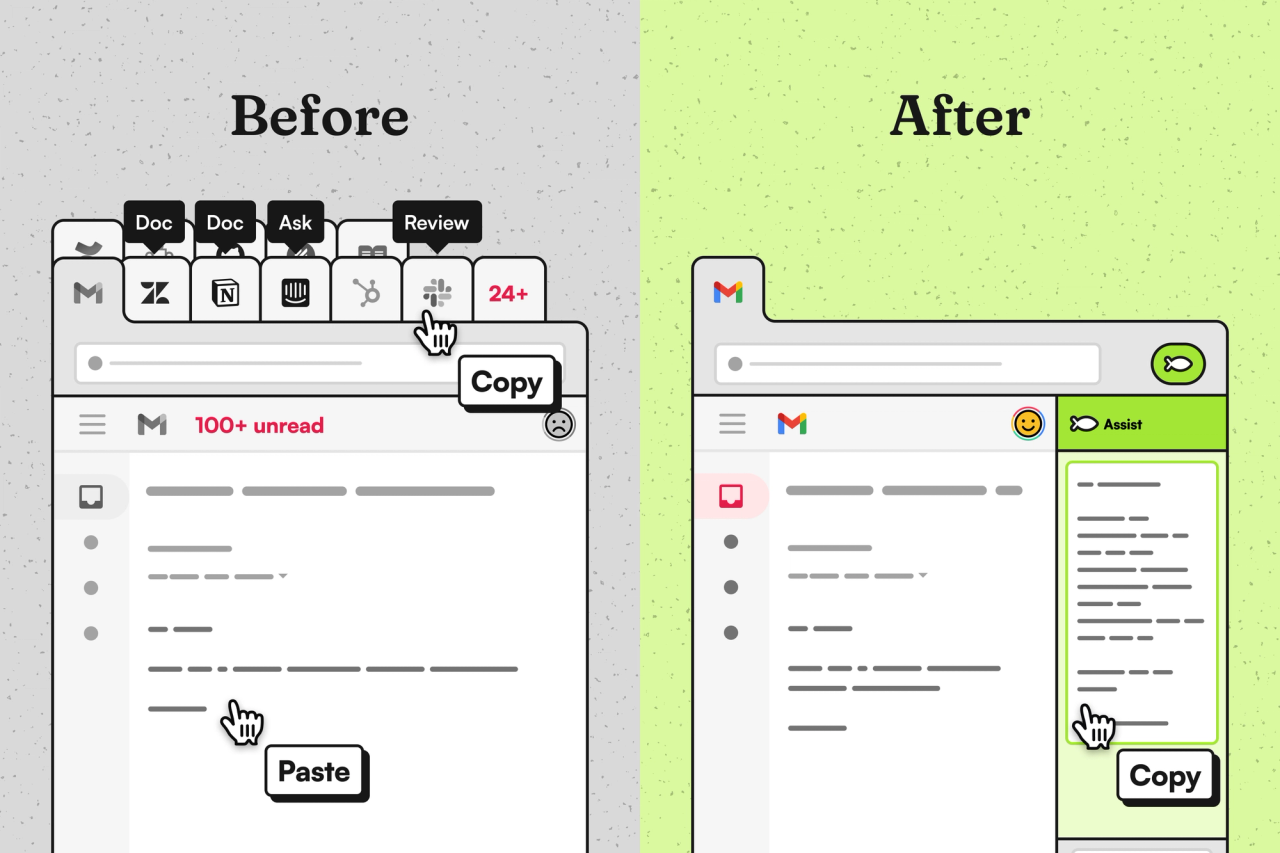
They copy an employee question into ChatGPT. Switch to the HRIS to check a policy. Search the knowledge base. Ping someone in Slack. Jump to a Google Doc. Reformat the answer. Second-guess themselves. By the time they hit send, they've spent ten minutes on something that should have taken thirty seconds.
Research shows this kind of task-switching can eat up to 40% of productive time. The problem isn't the volume, it's the tools. They make your team work around the problem instead of through it.
That's why we built Brainfish Assist.
The AI Assistant Problem Nobody Talks About
When AI first promised to accelerate knowledge work, teams expected fewer interruptions. Instead they got a different kind of work. Generic assistants confidently invent policies and deliver wrong answers unless you manually teach them your processes. Platform-specific assistants disappear the moment you leave that tool. And copy-pasting context from one place to another isn't automation - it's more manual steps.
The underlying issue is that most AI assistants don't have the context of the page you're on, they're not available everywhere you work, and they aren't grounded in your actual knowledge. That combination turns "helpful" AI into extra work.
Introducing Brainfish Assist
Brainfish Assist was built to solve that three-part problem. Rather than ask people to teach the AI what matters, Assist brings what matters - the question context and your single source of truth - directly into your workflow. It lives in the browser as a small, persistent sidebar and drafts grounded responses using only your approved documentation, policies, product specs, and internal resources.
Because it reads the email, ticket, or Slack thread that's already on screen and pulls answers from your knowledge layer, you don't need to copy and paste or babysit the model. You edit for tone and judgment and send. In short: Brainfish Assist removes the mechanical work and leaves the human work (empathy, judgment, decision-making) where it belongs.
How different teams use it
IT Support & Service Desk Teams open tickets in ServiceNow, Jira, or Freshservice and get instant answers grounded in runbooks, IT policies, and system documentation, without leaving the ticketing tool.
People Ops & HR Teams answer employee questions about benefits, policies, onboarding, and processes with responses pulled directly from your HRIS docs, handbooks, and internal wikis.
Customer Support Agents respond to customer inquiries across Zendesk, Intercom, or Gmail with context-aware answers grounded in help docs, API specs, and product knowledge.
Technical Support Specialists handle complex product questions with accurate, detailed responses sourced from engineering docs, release notes, and technical specifications.
Customer Success Managers access product info, implementation guides, and best practices instantly while supporting accounts, no more hunting through Drive folders mid-call.
Sales Teams get instant access to product details, pricing information, competitive positioning, and objection handling, grounded in approved sales collateral and product docs.
Employee End Users ask questions directly and get accurate answers to company, product, or process questions without waiting for someone else to respond.
Real-world example: Kloud Connect
Kloud Connect uses Brainfish Assist to support their customer-facing and internal teams directly inside the tools they already work in. Instead of switching between Confluence, Slack, tickets, and docs to piece together answers, their team opens Assist in the browser and drafts responses grounded in their Brainfish knowledge layer.
Assist eliminates the tab-hopping and guesswork, helping their team move faster while maintaining accuracy and consistency.
How it works
The experience is straightforward. Anyone opens any browser-based tool - ServiceNow, Gmail, Slack, Salesforce, Help Scout, Google Sheets, or any internal portal - and the Brainfish Assist sidebar is available without changing platforms. When they open Assist on a ticket, email, or question, it uses only the visible page context plus your Brainfish Knowledge Layer to draft a response. Those answers don't come from the open web or generic model knowledge; they're grounded in your company's approved docs so they don't hallucinate or guess.
Brainfish keeps your knowledge current by syncing from the tools you already use - Notion, Confluence, Google Drive, SharePoint, API docs, and similar sources so the content the assistant uses is the same content your teams trust.
Security, setup, and trust
Brainfish Assist only reads pages when someone explicitly opens it, and all data is encrypted in transit and at rest. We're SOC 2 Type II compliant and designed the extension so the permission model is explicit and minimal. Setup is a single Chrome extension install and a one-time permission acceptance; the whole process takes under two minutes.
What teams see
When you stop forcing people to reconstruct context, work changes. Newer team members ramp much faster because they no longer need tribal knowledge or elaborate rituals to answer questions. Experienced team members spend more time on judgment and less on manual, repetitive lookup tasks. Teams resolve more requests per hour at the same quality, and operations scale without simply hiring more bodies. Employees and customers notice steadier, more consistent answers.
The research backs this up. When Stanford and MIT looked at knowledge workers using AI assistants, they found productivity gains of 14% on average - with the biggest improvements going to less experienced team members. Translation: when your AI helps people resolve 14% more issues per hour, that compounds across your entire organization. No new hires. No overtime. Just more leverage for the team you already have.
The bigger picture
Brainfish Assist isn't a standalone tool. It's how we're delivering Brainfish's AI Knowledge Layer directly into your team's workflow.
When your company has complex products, evolving policies, and knowledge scattered across dozens of systems, information can't live in static docs. It needs to be dynamic. Contextual. Accurate across every team and use case.
Brainfish builds that layer. Brainfish Assist distributes it, right in your browser, where your team already spends their day.
This is not a replacement for people with chatbots. It’s about giving teams back the time they’re losing to repetitive, mechanical tasks so they can focus on the work that actually requires human judgment.
Why now
There are lots of AI assistants, but few combine three things at once: page awareness, persistent availability across tabs, and strong grounding in your company's knowledge. That combination, not intelligence alone, is what lets teams move faster without trading accuracy for speed.
The missing piece isn't intelligence. It's context + grounding + availability.
Ready to see it?
Stop losing 40% of your team's day to context-switching. Book a demo or reach out to your CSM.